Patent Drawings: Examples and Samples by Type
Twenty-six sample patent drawings across eight categories — with before/after pairs showing how a photo, sketch, or CAD view becomes a filing-ready figure. Open any example to start a similar drawing.
- 26 sample figures
- Before/after pairs
- 8 categories
- Open & adapt any example
The 30-second answer
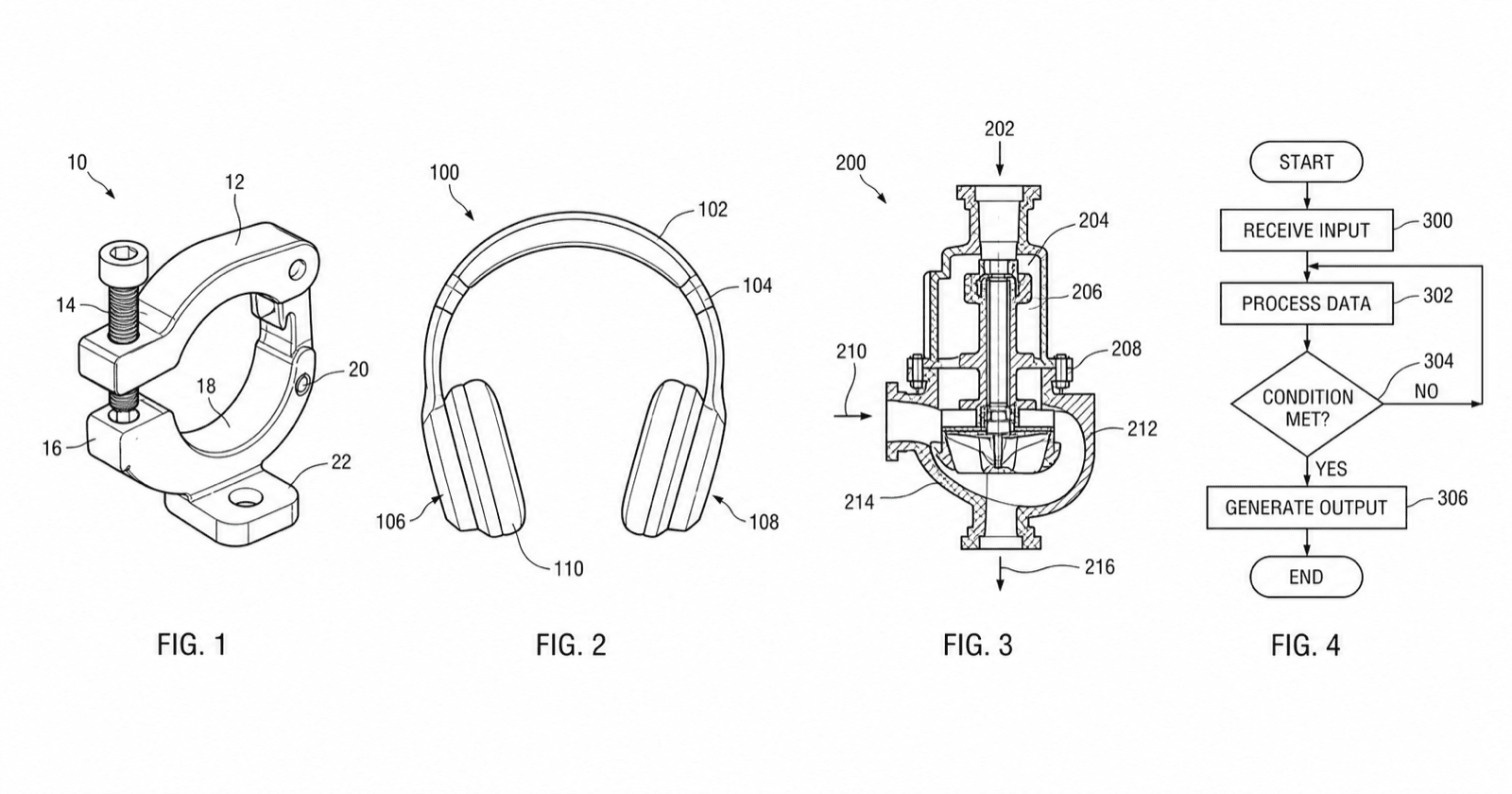
- A filing-ready patent drawing is black line art on white: uniform line weights, numbered views, and reference numerals with leader lines — no color, shading, or photo textures.
- The fastest way to get one is to start from the closest example below, pre-fill the generator with its prompt, and adapt it to your invention.
- Before filing, validate margins, DPI, line weight, and numerals against your patent office with the figure checker.
Sample patent drawings by category
Each sample is a fictional invention. Cards marked with a source image show the before/after: what went in, and the patent figure that came out.
Utility patent drawings
Utility figures show how an invention works. Every functional part gets a reference numeral with a leader line, and the same part keeps the same numeral across every view.
Design patent drawings
Design figures show ornamental appearance across a consistent view set — front, rear, sides, top, bottom. Claimed shape in solid lines, unclaimed context in broken lines, no reference numerals.
Mechanical patent drawings
Mechanical figures rely on section hatching for cut surfaces, consistent numerals across assembly states, and clean orthographic or perspective projection.
Electrical & circuit drawings
Circuit schematics use standard symbols and labeled nets; wiring diagrams use orthogonal routing. Both keep line weights uniform so the office can reproduce them at reduced scale.
Software flowcharts & process diagrams
Method claims are supported by flowcharts: numbered steps in boxes and decision diamonds, with arrows that make the claimed sequence unambiguous.
Block diagrams
System claims are supported by block diagrams: labeled rectangular modules, numbered 1xx/2xx/3xx by figure, connected by arrows that show signal or data flow.
Medical device drawings
Medical device figures often need multiple states (deployed/collapsed), cross-sections through housings, and exploded views — all with consistent numerals across figures.
Exploded views & cross-sections
Exploded views separate parts along a dashed alignment axis; cross-sections hatch every cut surface. Both must still satisfy line-weight and numeral rules.
The sample figures on this page were generated with PatentFig AI and are free to reuse in articles, tutorials, and course materials — credit PatentFig AI and link to patentfig.ai. Licensed under CC BY 4.0 The license permits reuse of the illustration asset; it does not mean an existing sample should be filed as a new patent drawing.
What does a patent drawing look like?
Every filing-ready patent figure — and every patent picture you see on this page — follows the same anatomy.
1
The sheet
White paper with fixed margins; figures are placed inside the usable area and numbered sheets assemble into the drawings section of the application.
2
Figure labels
Each view is a figure labeled FIG. 1, FIG. 2, … — one invention can span many figures across multiple sheets.
3
Reference numerals & leader lines
Numbered elements in the drawing (10, 12, 14 …) mark each claimed part, connected by thin leader lines, and keep the same number in every view.
4
Line-art rules
Solid black lines of uniform weight on white — no color, gray fills, or photo textures unless the office explicitly permits them.
Drawing vs. diagram vs. figure
Three words that overlap in search but mean different things in a patent application.
Patent drawing
The line-art view itself — a perspective, elevation, section, or exploded view of the invention drawn to convention.
Patent diagram
A schematic figure — block diagram, flowchart, circuit, or system diagram — used mostly in software, electrical, and AI/ML applications.
Patent figure
The formal unit the office sees: any drawing or diagram placed on a sheet and labeled FIG. n. Drawings and diagrams both become figures when filed.
How to use these examples
Examples are a faster starting point than a blank prompt.
Pick the closest category
Find the example that most resembles your invention type.
Open to pre-fill the generator
The prompt loads into /generate so you can adapt it to your invention.
Edit and add views
Adjust reference numerals, add views, and remove decorative shading.
Check before filing
Validate against your office with the figure checker, then export.
These examples help most when
- You want a reference for utility, design, mechanical, or electrical and circuit figures
- You are drafting a software flowchart, block diagram, or other process figure
- Your invention is a medical device or needs an exploded view or cross-section
- You want a working prompt to adapt instead of starting from a blank page
Look elsewhere when
- You need the exact office rules — see patent drawing requirements
- You need a six-office rule comparison — see patent drawing standards
- You want a finished figure now — open the generator and describe your invention
Patent drawing examples
Patent drawing examples FAQ
Turn an example into your own figure
Open any example to pre-fill the generator, then adapt it to your invention and export.
Related tools and guides
Patent drawing generator
Generate a patent drawing from a text description.
Patent drawing software
The full PatentFig workspace for filing-ready figure sets.
Patent drawing requirements
What the USPTO requires for compliant drawings.
Utility patent drawing generator
Generate utility figures with reference numerals.
Design patent drawing software
Consistent front/rear/side/top/bottom/perspective views.
Patent flowchart generator
Method and process flowcharts for software patents.
AI patent drawing generator
Photos, sketches, and 3D references to patent figures.