Design Patent Drawing Software
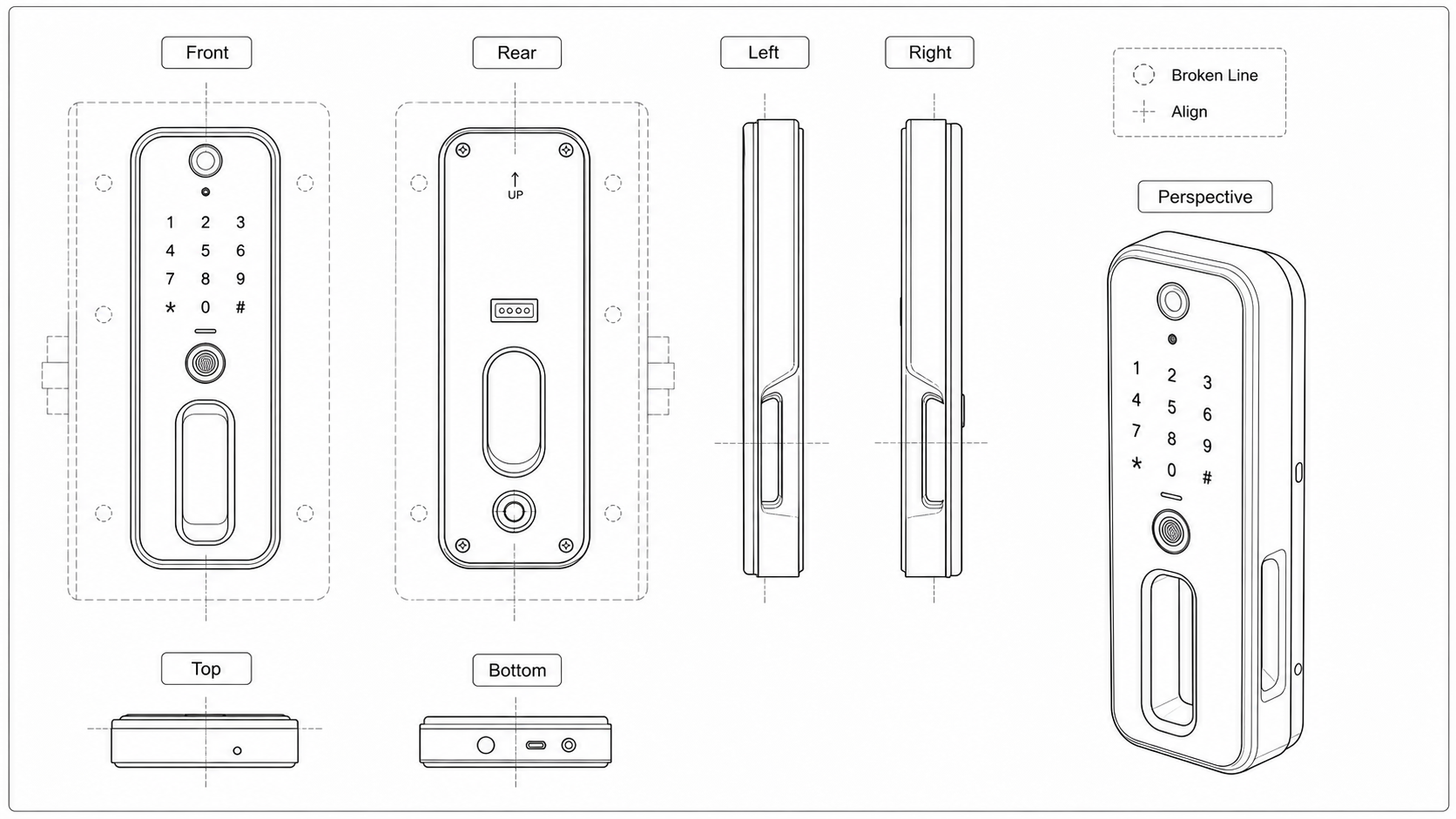
Prepare a coordinated ornamental view set in which every claimed contour stays consistent.
- Seven-view US design patent workflow
- Consistent silhouette and surface details
- Broken lines for unclaimed subject matter
- Surface shading without reference numerals
Appearance is the disclosure
- Use solid lines for the ornamental features you intend to claim and broken lines only for environment or portions you do not claim.
- Check every view against the same anchor before filing; a contour that appears in one view and disappears in another can change the disclosure.
Design patent drawing examples
Fictional products as consistent view sets — the format design patents require — plus the three conventions that decide design filings: broken lines, surface shading, and cross-view consistency. Open one to pre-fill the generator.
Build one consistent view set
Treat the source image as the geometry anchor and derive every required view from the same claimed design.
1
Choose a trustworthy anchor
Use a clean CAD render, product photo, or sketch that shows the claimed shape without lens distortion or hidden design changes.
2
Generate the orthographic views
Prepare front, rear, left, right, top, and bottom views with matching proportions, seams, openings, and edge treatment.
3
Add a perspective view
Use the perspective figure to communicate the three-dimensional character while preserving every feature shown in the elevations.
Control the legal visual language
Broken lines and shading affect what the drawings communicate and should be applied as deliberate claim choices.
Separate claimed and unclaimed matter
Keep claimed contours solid and use a consistent broken-line convention for environment or disclaimed portions.
Use shading consistently
Apply line shading or stippling only where it helps show contour and surface character, using the same convention in every view.
Remove utility-patent notation
Design patent views normally should not carry component numerals, lead lines, part names, or functional callouts.
Review before treating the set as final
Compare adjacent views feature by feature and have qualified counsel confirm claim scope before filing.
Check silhouette continuity
A radius, taper, opening, seam, or projection must reconcile across every view in which it should be visible.
Check line-status continuity
The same feature should not switch between claimed solid line and unclaimed broken line without a deliberate reason.
Confirm jurisdiction and counsel review
View requirements and drawing practice vary; use the generated set as drafting support, not a substitute for legal judgment.
Design Patent Drawing Software
Design Patent Drawing FAQ
Start a consistent design patent view set
Upload the clearest photo, render, or sketch of the design and establish the anchor view first.
Related workflows
Detailed guide
Read the Design Patent Drawing Software workflow article.
Patent drawing software
Compare the full PatentFig AI software workflow for IP teams.
Patent drawing examples
Browse sample patent drawings across every category.
Check figure compliance
Review DPI, line work, margins, color mode, and readability.
Patent drawing workflow guide
Browse PatentFig AI drawing workflows by filing task and source material.