What Does a Patent Look Like? Annotated Example of Every Page (2026)
What does a patent look like? The anatomy of a US patent: title page, specification, claims, abstract, and drawing sheets — with an annotated fictional example showing the exact format the USPTO expects.
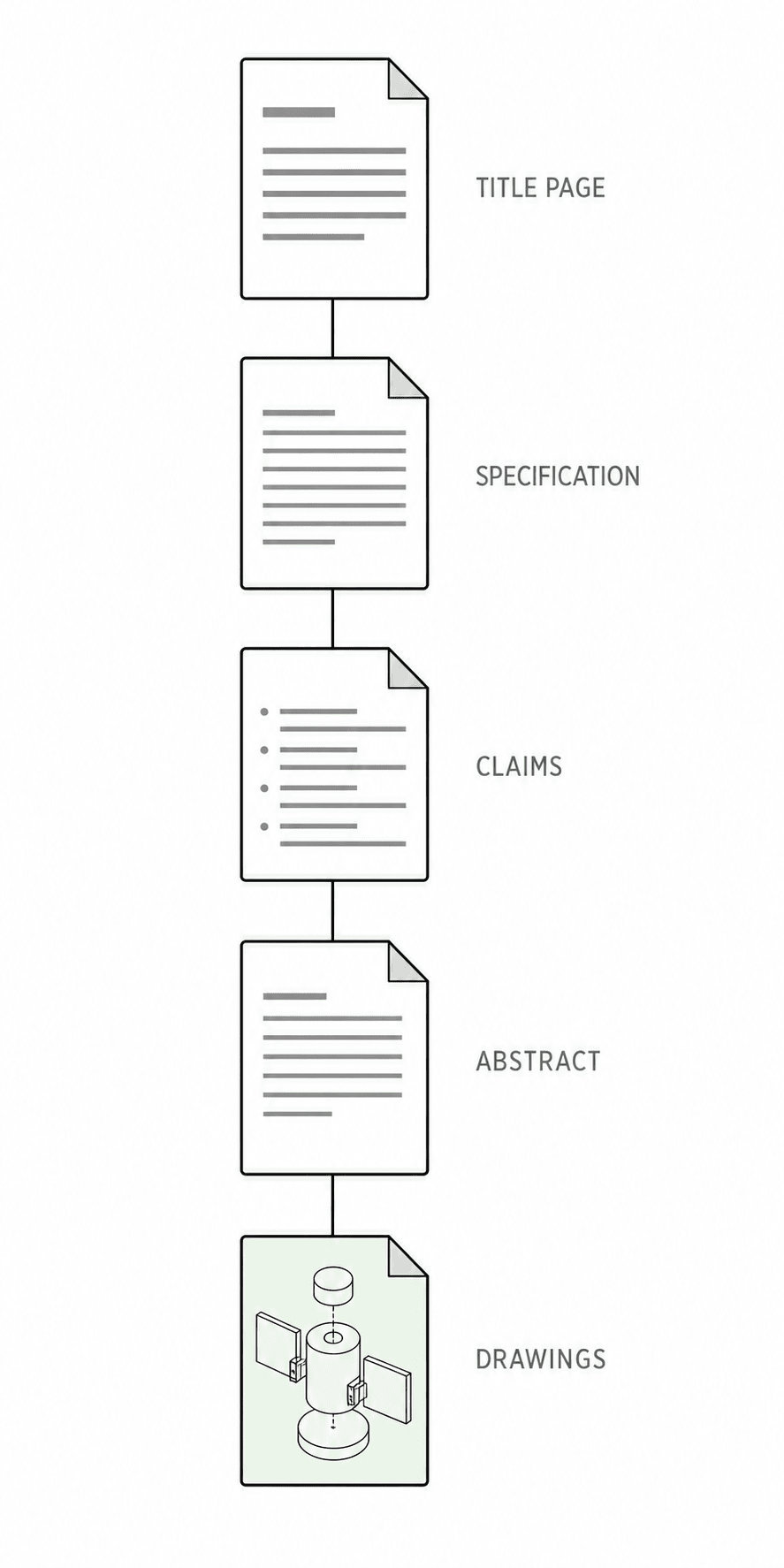
TL;DR: A US patent is not one document but five stacked parts: a title page of bibliographic data, a specification that teaches the invention, claims that define the legal boundary, an abstract, and drawing sheets of numbered black-and-white figures. Every published patent follows this same format, so once you can read one, you can read them all — and once you know the format, you know exactly what your own application has to look like.
If you have never held a patent in your hands, the word probably evokes a gold seal and a ribbon. The working reality is a standardized technical document — and the standardization is the point: examiners, attorneys, and courts all navigate a patent by knowing exactly where everything lives. This guide walks the US patent format page by page, using a fictional example (an "air-flow bicycle helmet") so nothing here reproduces anyone's actual filing.
The title page: a patent's ID card
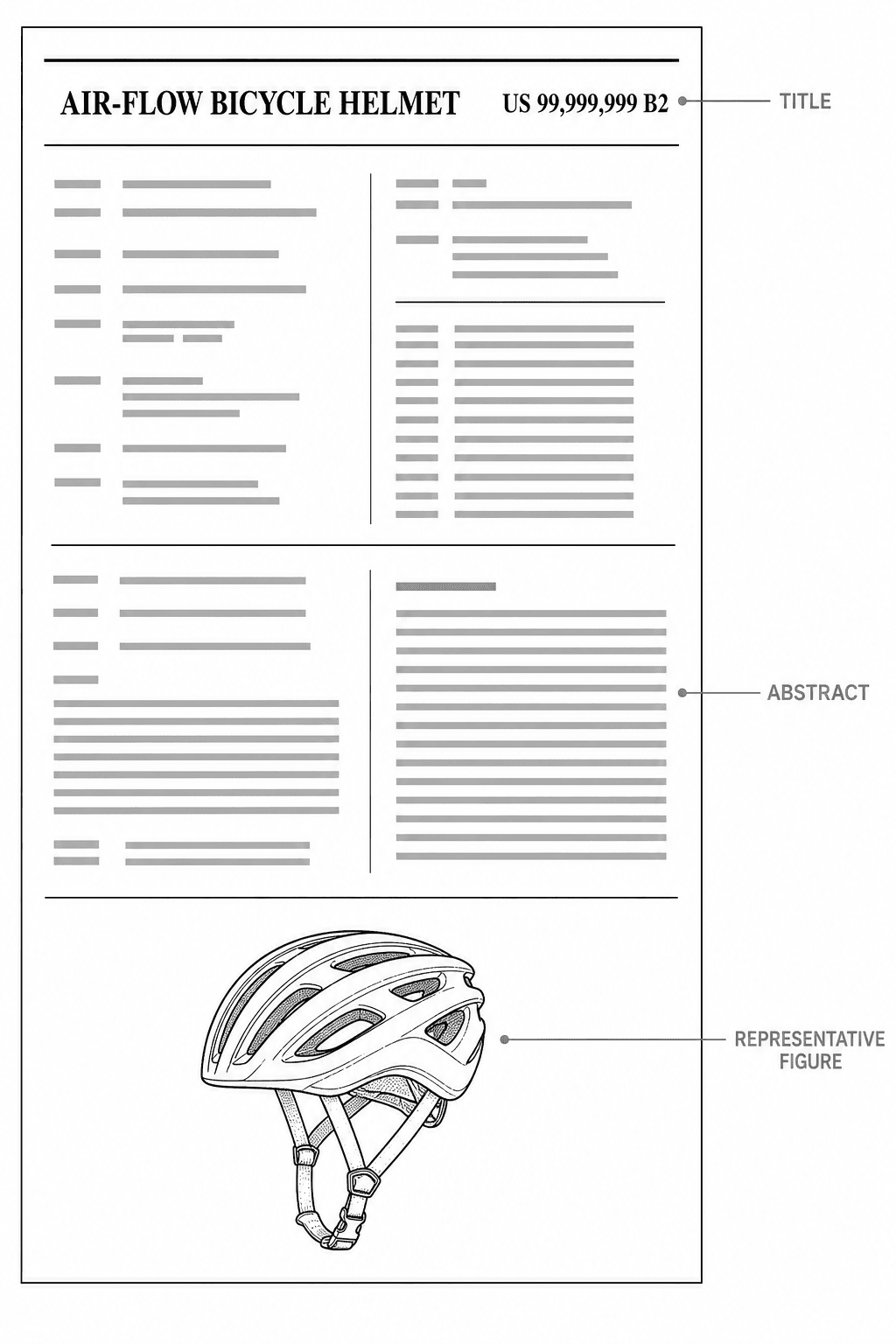
The front page of a granted patent is generated by the USPTO from your filing, and it compresses the whole record into one sheet:
- Patent number and kind code — e.g.
US 99,999,999 B2.B2means a granted utility patent that had a published application;B1granted without prior publication;Sis a design patent. - Title (54) — short and descriptive. The numbers in parentheses you see on real patents are INID codes, an international standard for bibliographic fields.
- Inventors, assignee, filing and grant dates — who invented it, who owns it, and the timeline that anchors the patent term.
- References cited — the prior art the examiner considered.
- Abstract (57) — a single paragraph, 150 words or fewer, summarizing the disclosure.
- A representative figure — one drawing chosen from your sheets, printed right on the front page. Worth remembering: one of your figures becomes the public face of the patent.
The specification: where the invention is taught
The specification is the longest part and follows a fixed section order for utility applications:
- Title of the invention
- Cross-reference to related applications (if any)
- Background — the problem context, kept brief in modern practice
- Summary — the invention in solution terms
- Brief description of the drawings — one line per figure: "FIG. 1 is a perspective view of…"
- Detailed description — the heart of the document, walking through each figure part by part
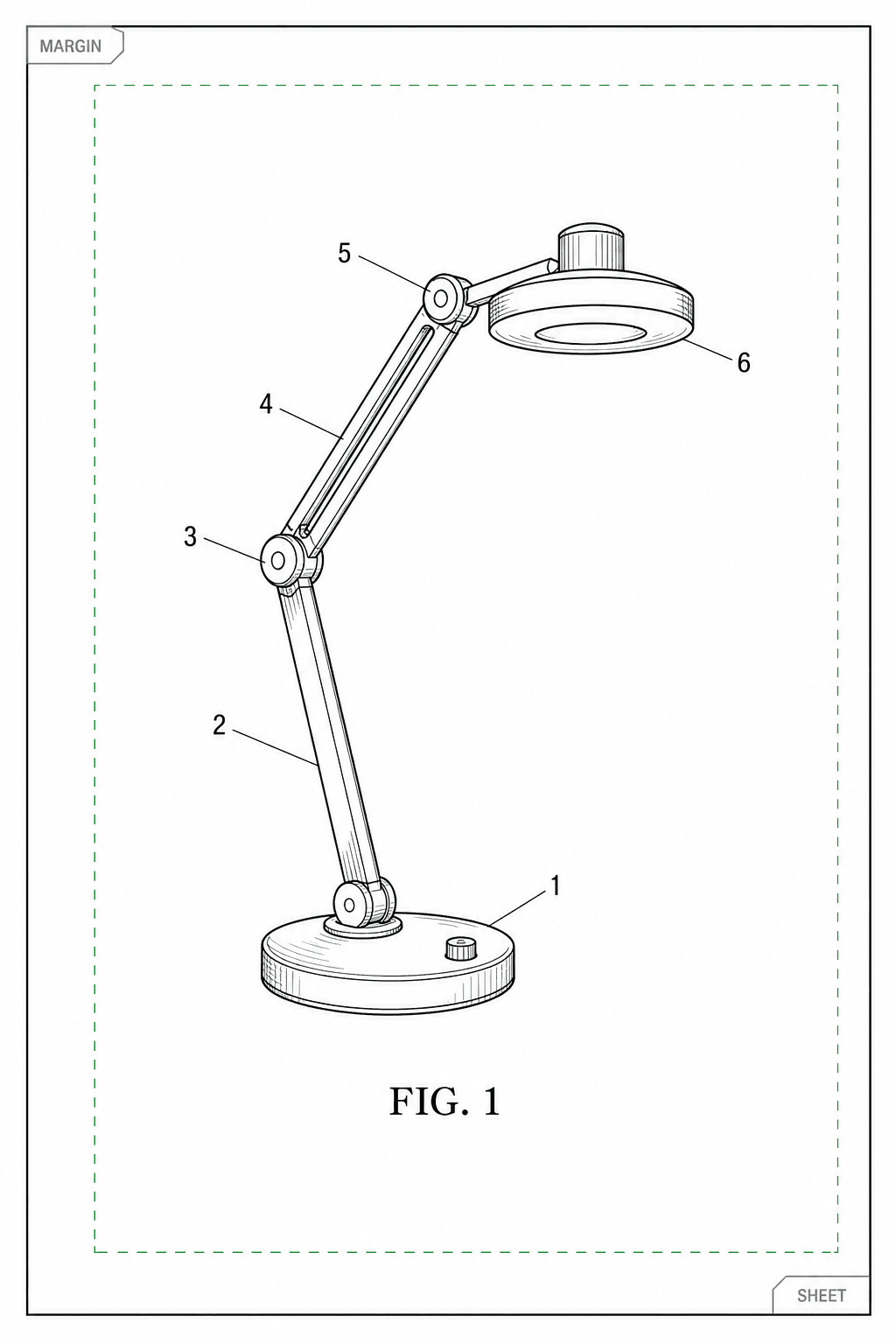
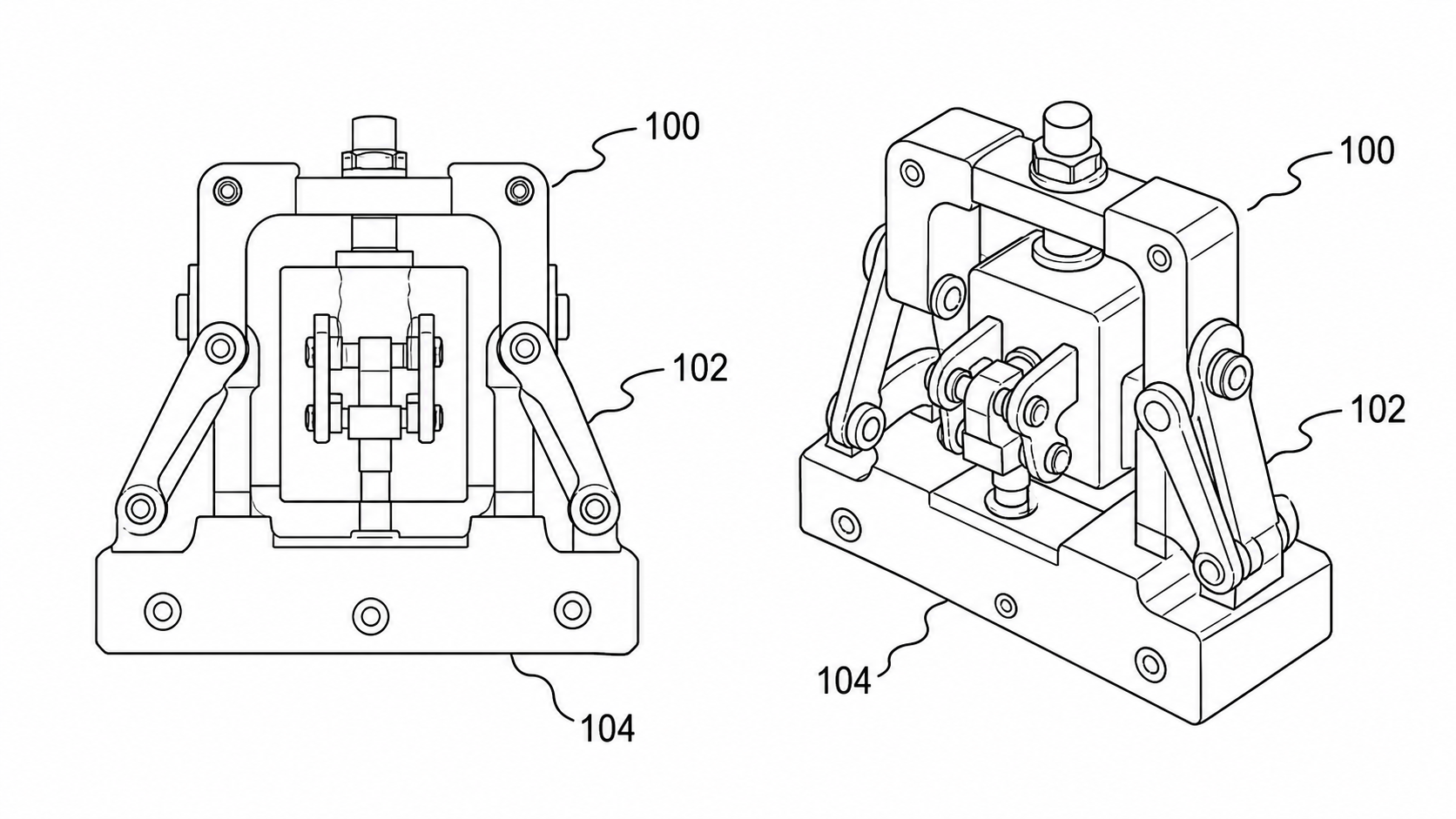
The detailed description and the drawings are locked together by reference numerals: the first time a part appears in text it gets a number ("helmet shell 10"), and that number marks the same part in every figure. This cross-referencing is why figure numbering discipline matters so much — a numeral that means two different things in two places is a formal defect.
The claims: the legal boundary
Claims follow the specification and begin with the fixed phrase "What is claimed is:" followed by numbered sentences. Each claim is technically a single sentence — sometimes a very long one — defining one version of the protected scope. Independent claims stand alone; dependent claims narrow a parent claim ("The helmet of claim 1, wherein…").
For drawing purposes the rule that matters is simple: every element recited in a claim should be findable in the figures. Examiners check. An apparatus claim with a part the drawings never show invites an objection under 37 CFR §1.83.
The drawing sheets: the part most people recognize
Drawings come last in the document but are usually read first — they are the fastest way to understand any patent. The format is strict:
- Paper: 8.5 × 11 inch or A4, white, portrait orientation.
- Margins: top 2.5 cm, left 2.5 cm, right 1.5 cm, bottom 1.0 cm — figures may not intrude into them.
- Sheet numbering: "1/3, 2/3, 3/3" centered at the top.
- Figures: each view labeled
FIG. 1,FIG. 2, …, in solid black lines of uniform weight, with reference numerals connected by leader lines. - No color, no gray fills, no photographs except in narrow cases with a petition.
If you want to see the full range of what compliant figures look like — utility views, design view sets, sections, exploded views, flowcharts — the patent drawing examples gallery shows 26 fictional samples drawn to these conventions, and the drawing requirements guide lists the rules office by office.
Reading real patents (free)
Two official sources show every published US patent in full:
- Google Patents — search any term, open the PDF tab for the original formatting.
- USPTO Patent Public Search — the office's own search tool.
Pick any granted patent in your product category and skim it against this guide: front page, spec, claims, drawings. The format will match — it always does.
From reading the format to producing it
Understanding the format is half the work; producing compliant pages is the other half. The text sections are ordinary word processing, but the drawing sheets have the tightest formal rules — which is where most DIY applications pick up objections.
The modern shortcut: describe your invention or upload a sketch or photo to the AI patent drawing generator, get line-art figures with consistent reference numerals, then validate margins, DPI, and numerals with the figure checker before filing. The step-by-step drawing guide walks the full workflow from source material to finished sheets.
Sources: 37 CFR §1.84 (drawing standards) · 37 CFR §1.77 (application arrangement) · MPEP 608 (disclosure) · USPTO Patent Public Search
More Posts
Black-and-White Patent Line Art: Reference Numerals, Lead Lines, and What Examiners Check
How patent figures must be pure black-and-white line art, where reference numerals belong, which lead-line styles pass, and the USPTO 37 CFR §1.84 and CNIPA rejections to avoid.

USPTO Patent Drawing Requirements 2026: Checklist, Margins & Examples
USPTO patent drawing requirements for 2026: 37 CFR 1.84 checklist, margins, line rules, reference numerals, examples, and pre-filing checks.
Utility Patent Drawings vs Design Patent Drawings: Which Figures You Need
Compare utility patent drawings and design patent drawings: figure purpose, views, line rules, broken lines, reference numerals, and when to use each workflow.
Newsletter
Join the community
Subscribe to our newsletter for the latest news and updates