How to Make Patent Drawings, Step by Step
From “what views do I need?” to a filing-ready sheet: the full workflow for drawing a patent — whether you start from a sketch, a photo, a CAD view, or a plain-text description.
- 7-step workflow
- Worked example included
- Hand, CAD, or AI
- USPTO-checklist finish
The 30-second answer
- Decide utility (how it works, with reference numerals) or design (how it looks, view set, no numerals), list the views a reader needs, then draw each view as uniform black line art on white.
- Number every claimed part with reference numerals and leader lines, keep numbers identical across views, and place figures on sheets with correct margins.
- The fastest route: upload a sketch or photo to the generator, let it apply the conventions, then run the figure checker before filing.
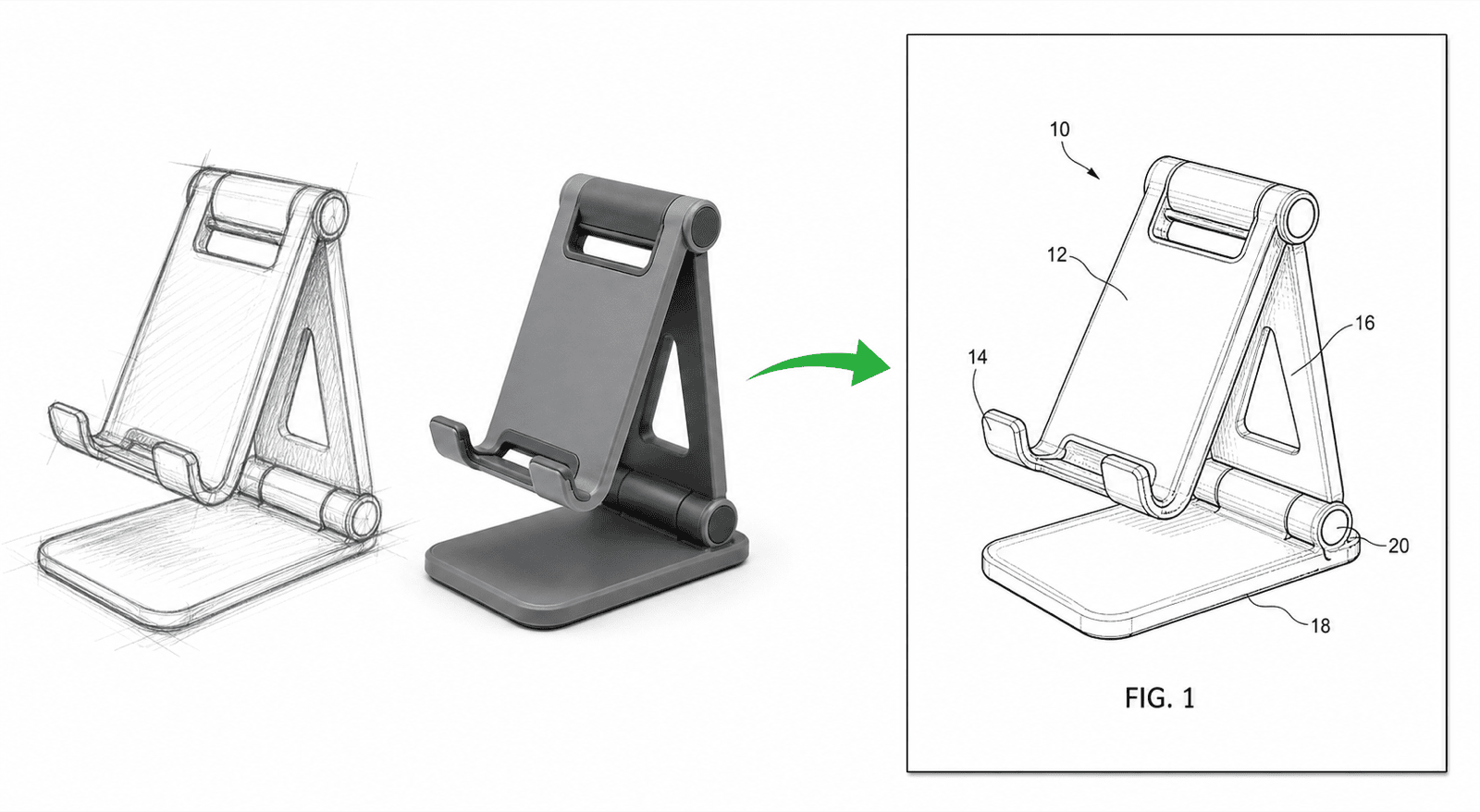
Worked example: from photo to filing-ready figure
One fictional invention — a collapsible phone stand — taken through the whole workflow. Open it to pre-fill the generator with the same kind of prompt.
The 7-step workflow
Every filing-ready drawing — hand-drawn, CAD, or AI-generated — goes through these steps.
1
1. Decide the drawing type
Utility drawings explain how the invention works and carry reference numerals. Design drawings claim ornamental appearance in a consistent view set with no numerals. Provisional filings accept informal drawings, but drawing formally now saves a redo later.
2
2. Plan the views
List what a reader must see to understand every claim: usually a perspective or front view, plus sections, details, exploded views, or flowcharts. Design applications typically need front, rear, both sides, top, bottom, and perspective.
3
3. Capture your source
Photograph the prototype straight-on in even light, scan the sketch, or export a clean CAD view. For text-only starts, write one precise paragraph naming every part you will claim.
4
4. Produce the first line-art draft
Convert the source to solid black lines of uniform weight on white — no color, gray fills, shadows, or photo textures. Hidden structure gets a section view, not transparency.
5
5. Add numerals and labels
Label each view FIG. 1, FIG. 2, …; give every claimed part a reference numeral with a thin leader line; keep the same numeral for the same part in every figure and in the specification.
6
6. Assemble the sheets
Place figures on white sheets with the required margins, number the sheets, and keep figures upright and separated — never crowded or overlapping the margin area.
7
7. Check, export, review
Validate margins, DPI, line weights, and numeral consistency with the figure checker, export to the format your filing route needs (TIFF, PDF, or vector), and have your attorney or agent review before filing.
Hand, CAD, or AI — how the three routes compare
The conventions are identical; the routes differ in speed and where errors creep in.
By hand
Viable for simple utility figures; slow for view sets, and numeral bookkeeping is error-prone. Budget several hours per figure.
With CAD
Precise geometry, but patent rules are manual: line weights, numeral placement, and view consistency are on you, and export settings decide compliance.
With an AI generator
Upload the source, get convention-following line art with numerals in minutes, then edit by chat. Best speed-to-compliance ratio for most filings — verify with the checker either way.
Common mistakes that trigger objections
The same handful of errors accounts for most drawing objections.
Inconsistent numerals
Part 12 in FIG. 1 must be part 12 in every figure and in the text — renumbering between views is the classic objection.
Photos or gray shading
Offices expect black line art; photographs and gray fills are only accepted in narrow cases.
Missing views
A design claim without its full view set, or an apparatus claim with an invisible key part, invites rejection.
Margin and size violations
Figures that cross into margins or numerals too small to reproduce at reduced scale fail the format check.
This guide helps most when
- You are preparing your first utility or provisional application and need drawings
- You have a sketch, photo, or CAD model and want to know how it becomes a patent figure
- You want to draw a patent yourself before paying an illustrator
- You need a checklist to review drawings someone else made
Look elsewhere when
- You need the exact office rules — see patent drawing requirements
- You want reference figures to copy from — see patent drawing examples
- You want a finished figure now — open the generator and describe your invention
How-to guide
How-to FAQ
Make your first patent drawing now
Describe your invention or upload a sketch or photo — the generator applies the conventions from this guide automatically.
Related tools and guides
Guide: what does a patent look like?
The anatomy of a US patent — title page, specification, claims, and drawing sheets.
Patent drawing examples
Browse sample patent figures across every category.
Patent drawing requirements
What the USPTO requires for compliant drawings.
AI patent drawing generator
Photos, sketches, and 3D references to patent figures.
Figure checker
Validate figures against office rules before filing.
Patent drawing software
The full PatentFig workspace for filing-ready figure sets.
Patent drawing services
2026 rates from real companies, and when software wins.