Fix Patent Drawing Rejections Before (and After) Filing
A drawing objection or a Notice to File Corrected Application Papers does not require re-hiring an illustrator. Identify which of the six common objections you received, fix the figure, and file compliant replacement sheets — usually the same day.
- Six common objections
- Same-day replacement sheets
- Pre-filing checker
- No rush fees
The 30-second answer
- Nearly all drawing objections fall into six buckets: margin violations, gray or photographic shading, faint or uneven lines, reference numerals that are too small, leader lines that miss or omit their part, and unlabeled or mislabeled views.
- The fix is not re-outsourcing: regenerate or correct the flagged figure in PatentFig AI, mark each page "Replacement Sheet", and file the corrected set the same day.
- Before your next filing, run the full set through the figure checker so the objection never issues in the first place.
Figures that draw objections
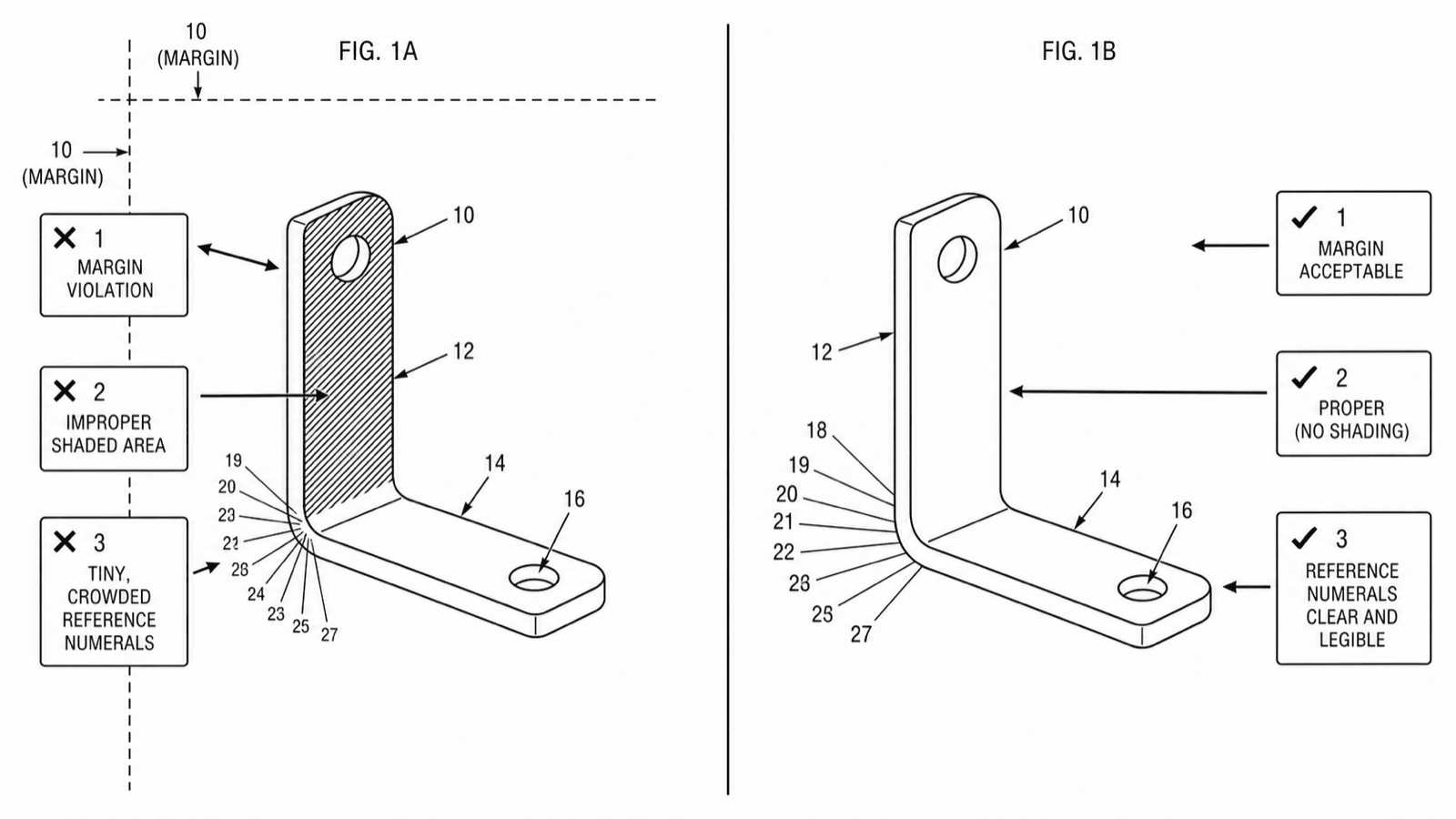
Three real failure patterns from the figure checker — and why an examiner would flag each one.
The six objections examiners raise most
Match the language in your Notice or office action to one of these — each has a mechanical fix.
1
Margin violations
Content crosses into the required margins (USPTO: 2.5 cm top/left, 1.5 cm right, 1 cm bottom). Fix: rescale or reposition the figure inside the sight area and re-export.
2
Gray shading or photographs
Grayscale fills, gradients, and photographic texture do not reproduce. Fix: regenerate as pure black-and-white line art, using line shading or hatching where surface contour matters.
3
Faint or uneven lines
Thin, light, or broken lines fail the "durable, black, sufficiently dense" standard. Fix: regenerate with uniform solid line weights and export at 300–600 DPI.
4
Reference numerals too small
Numerals must be at least 1/8 inch (3.2 mm) tall. Fix: enlarge numeral text, and move crowded numerals outside the outline with leader lines.
5
Missing or stray leader lines
Every numeral needs a leader line that touches its part; none may cross each other confusingly. Fix: redraw leaders so each numeral connects unambiguously.
6
Unlabeled or inconsistent views
Every view needs a "FIG." label, and labels must match the brief description in the specification. Fix: add or renumber labels consistently across the set.
Replacement sheet rules in 60 seconds
The summary version of 37 CFR 1.121(d) and MPEP 608.02 — details belong in the full guide and your attorney’s hands.
Label every corrected page
Each corrected page carries the header "Replacement Sheet" per 37 CFR 1.121(d), placed in the top margin.
Replace whole sheets
You file a complete replacement page, not a patch — every figure on the sheet must appear, even ones you did not change.
No new matter
Corrections may fix presentation, not add structure or features absent from the original disclosure. When in doubt, ask your attorney or agent.
Follow the Notice’s instructions
MPEP 608.02(h) and the Notice itself govern format and deadlines — read the specific Notice you received; this page is a summary, not legal advice.
Back to the drawing service vs. fixing it in software
What a correction round costs each way once a Notice or objection lands.
Back to the drawing service
Fix it in PatentFig AI
Turnaround
Days — often on rush terms
Same day
Cost of correction
$100+ per corrected sheet, rush premium on top
Included in the subscription
Re-checking the set
Manual, if offered
Figure checker validates against six offices
Iterating on the fix
Each round is a new billable job
Unlimited revisions, chat-to-modify
Deadline risk
Depends on the provider’s queue
You control the timeline
Best for
Substantive redraws needing a specialist
Formatting objections — the common case
Fix it in PatentFig AI when
- The objection cites formatting issues — margins, shading, line quality, numerals, labels
- The office action deadline is close and a service’s rush queue is too slow
- You want to re-check the whole corrected set against office rules before resubmitting
- You would rather not restart the per-sheet meter for a mechanical correction
Bring in a professional when
- The objection raises substantive disclosure problems, not formatting
- The correction risks introducing new matter and you need expert judgment
- The case is in litigation and every figure needs a specialist’s final pass
Corrections guide
Patent drawing rejection FAQ
Clear the objection today
Check the flagged figures, generate corrected versions, and export replacement sheets — without a rush fee.
Related tools and guides
Guide: how to respond to a USPTO drawing objection
The full walkthrough — reading the Notice, replacement sheet format, and resubmission.
Patent drawing standards
USPTO, EPO, CNIPA, JPO, KIPO and PCT drawing rules.
Patent drawing requirements
What the USPTO requires for compliant drawings.
Patent drawing generator
Generate a patent drawing from a text description.
Patent figure numbering
How to number figures and reference numerals.
Patent application drawings
Prepare the drawing set for a patent application.