Chemical Apparatus Patent Drawings
Chemical inventions are claimed twice — as vessels and as flows. The vessel claims want hatched cross-sections that show every internal; the process claims want flow diagrams with proper symbols, numbered streams, and arrows that actually point.
- Hatched vessel sections
- Patent-style PFDs
- Standard valve symbols
- Numbered streams with arrows
The 30-second answer
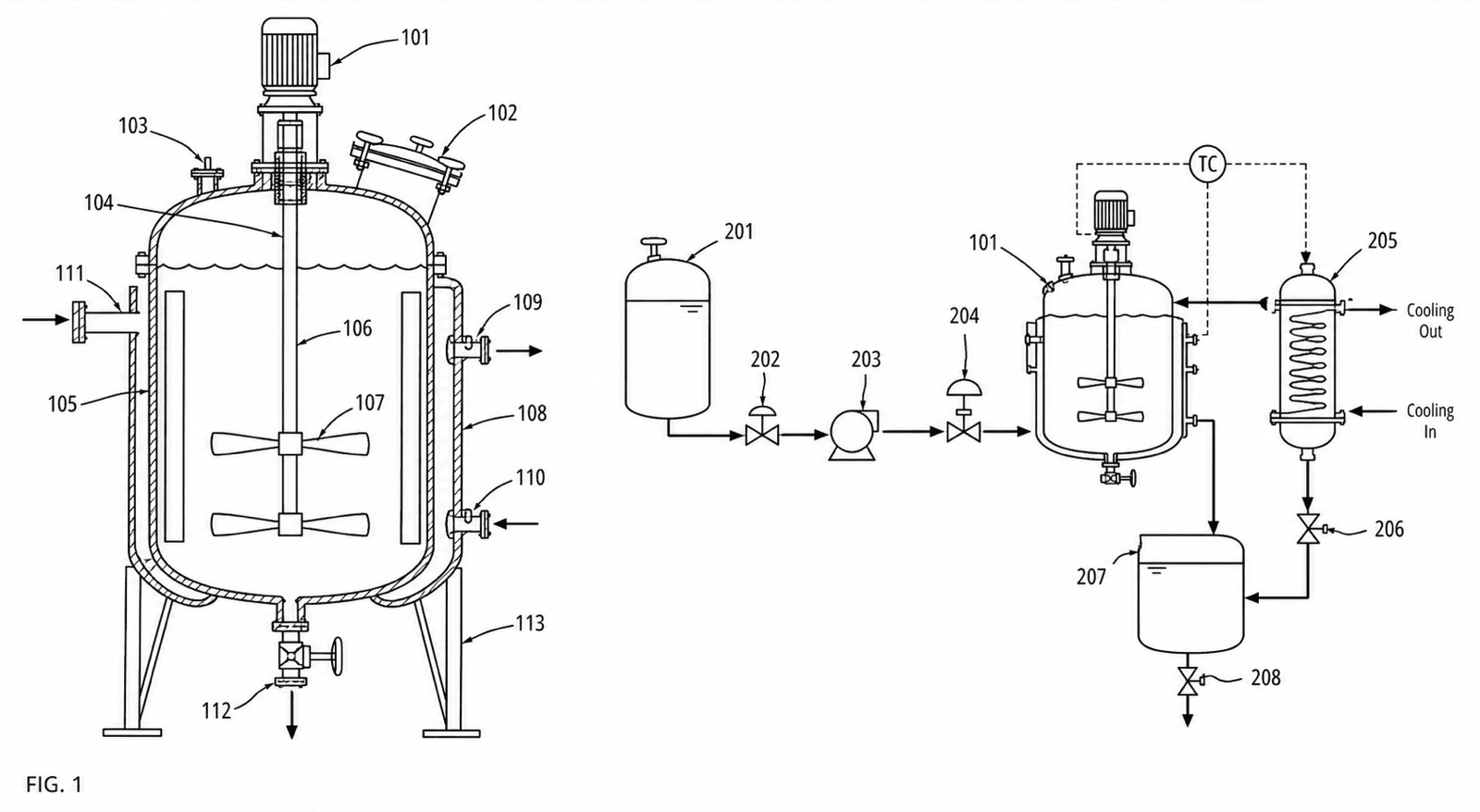
- Vessel and equipment claims → cross-sections with section hatching, drawing every claimed internal: jacket, baffles, agitator, distributor, trays.
- Process claims → a black-and-white PFD with standard valve and pump symbols, numbered equipment and streams, and a direction arrow on every flow line.
- Column internals get a full section plus enlarged details of the claimed tray or packing geometry — generate, number, and check the set in PatentFig AI.
Chemical apparatus figure examples
Each example is a fictional invention. Open one to pre-fill the generator with the prompt.
Which figures support which claims
Chemical claims split between the equipment and the process running through it.
1
Vessel claims → hatched cross-sections
The reactor cut vertically: wall, heating jacket, agitator shaft and impellers, baffles, inlets and outlets — cut surfaces hatched, every claimed internal numbered.
2
Process claims → patent-style PFDs
Feed, reaction, separation, and recovery as simple equipment outlines connected by numbered streams with direction arrows and standard valve symbols.
3
Column claims → section plus enlarged internals
The full column in section as one figure, with the claimed tray, distributor, or packing geometry enlarged as a detail view where it is actually legible.
4
Heat-exchange claims → sectioned exchangers
Shell-and-tube or plate geometry in section with both flow paths arrowed and numbered, so the claimed flow arrangement reads on the figure.
5
Control-scheme claims → flowcharts
When claims recite control logic — temperature ramps, staged additions — a numbered flowchart mirrors the claim steps alongside the PFD.
Chemical drawing mistakes that cost office actions
The failure patterns specific to apparatus and flow figures.
Color-coded streams on the PFD
Engineering flowsheets color streams by phase or temperature; patent figures must be black-and-white. Differentiate streams with numerals and line styles, never color.
Claimed internals missing from the section
If the claim recites a cooling jacket or baffles, the section must show them — a smooth-walled vessel under a jacketed-reactor claim is a disclosure gap, not a simplification.
Nonstandard valve symbols
Improvised valve glyphs read as unidentified components. Use the conventional bowtie family of symbols and give each valve its numeral.
Flow lines without arrows
A PFD line with no direction arrow leaves the claimed sequence ambiguous — recycle streams especially. Every line gets an arrowhead.
Engineering flowsheets and services vs. PatentFig AI
Your P&ID is the right input and the wrong output — patent figures follow different rules.
P&ID exports / drawing services
PatentFig AI
Black-and-white discipline
Flowsheets ship in color; services redraw by hand
Generated as compliant line art directly
Vessel sections
Specialist work, billed per sheet
Generated with hatching and numbered internals
Section ↔ PFD numeral sync
Manual coordination
One numeral series across the set
Stream renumbering on amendment
$50–$100 per round, days each
Chat edits, same day
Compliance check
Manual review
Built-in checker for six offices
Cost
$100+ per sheet at specialist rates
Free tier; $50/mo · 500 credits · ~50 figures (~$1 each)
PatentFig AI is the better fit when
- The set pairs vessel sections with PFDs and both must share equipment numerals
- Your sources are colored P&IDs, simulation flowsheets, or hand sketches
- Claims are amended and stream numbering must follow without a vendor round-trip
- The family files across USPTO, EPO, CNIPA, JPO, or KIPO
Other channels fit better when
- You need an engineering-grade P&ID for construction, not a patent figure
- A litigation-grade figure set needs a specialist’s certification
- The disclosure is purely chemical formulae — structures, not apparatus
Industry guide
Chemical apparatus drawings FAQ
Draw the vessel and the flow
Hatched sections, patent-style PFDs, and column details — one consistent set, checked before filing.
Related tools and guides
Mechanical patent drawing generator
Vessels, exchangers, and equipment line art.
Patent flowchart generator
Method and process flowcharts for software patents.
Cross-section examples
Sample sectional figures from the examples gallery.
Figure checker
Validate figures against office rules before filing.
Patent drawing standards
USPTO, EPO, CNIPA, JPO, KIPO and PCT drawing rules.
Guide: automating patent flowcharts
From process architectures to numbered method steps.