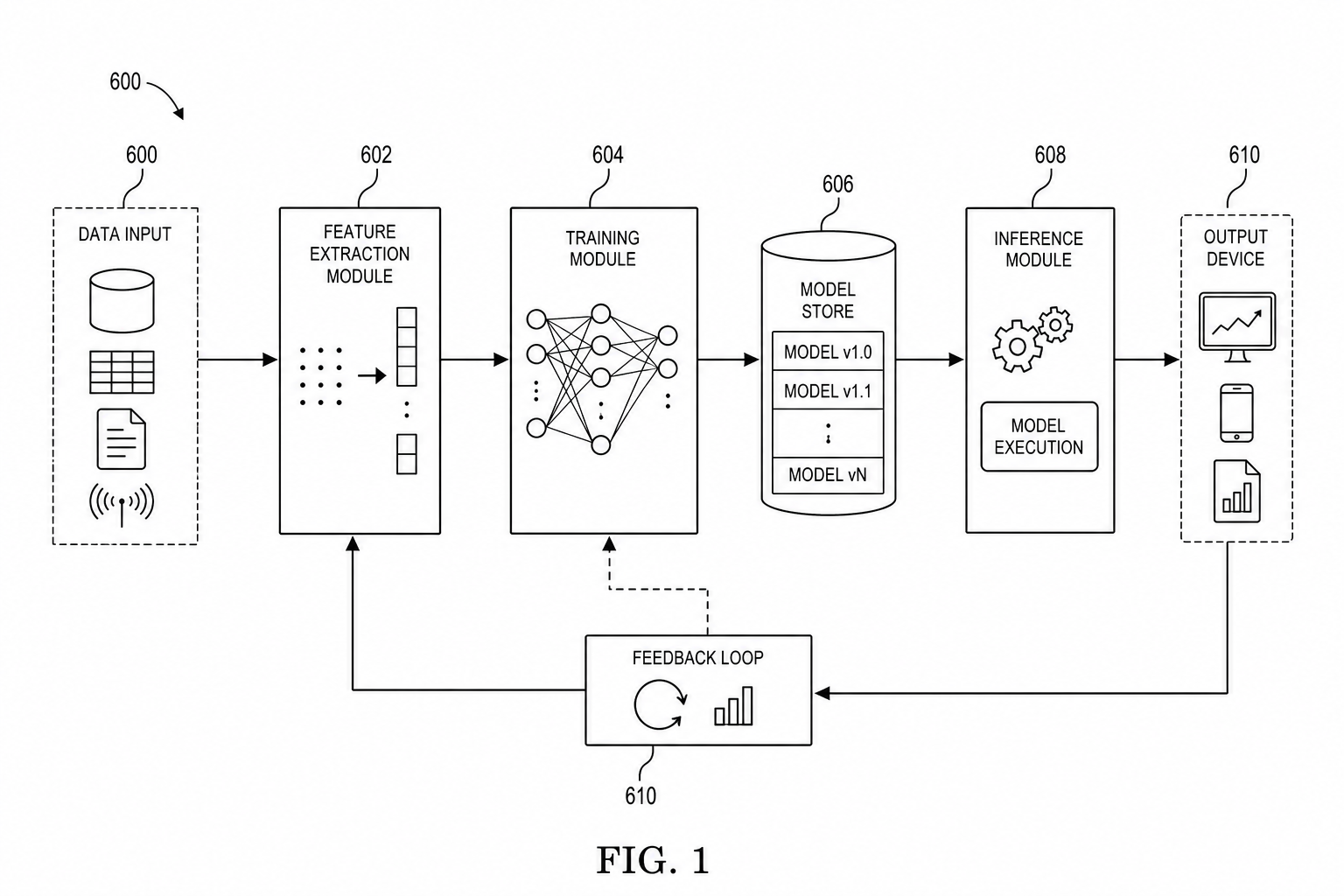
AI/ML Patent Diagrams: Model Pipeline, Training Flow, and Inference System
Create clearer AI and machine learning patent diagrams for model pipelines, training workflows, inference systems, RAG architectures, and agent workflows.
TL;DR: A single generic "AI model" box is the most common failure in AI/ML patent figures. Use at least two figure types — a training-flow diagram and a separate inference-flow diagram — and make every box, arrow, and data-versus-control distinction correspond to claim language; RAG and agent systems get their own orchestration figure.
AI patent figures fail when they look like product slides. Boxes named "AI" or "model" are not enough. The drawing should explain data movement, training, inference, orchestration, and the part of the workflow that supports the claim.
Start with the AI / ML patent diagram generator when your source is a model pipeline, RAG architecture, agent workflow, or training method.
The Mistake: One Generic AI Box
A weak AI patent drawing usually compresses the invention into one box labeled "AI engine." That may look tidy, but it rarely helps the reader understand what is new. The important detail may be a training loop, a feature extraction step, a retrieval stage, a model selection rule, a feedback path, or a deployment boundary.
The goal is not to expose every model parameter. The goal is to create figures that let the written disclosure point to concrete modules and steps. If the specification says that a verifier scores retrieved context before inference, the figure should show where retrieval, verification, and model execution sit in relation to each other.
Use At Least Two Figure Types
Most AI applications benefit from two complementary figures:
- a block diagram showing modules and system boundaries
- a method flowchart showing ordered steps
If you only provide one architecture picture, the method may be hard to follow. If you only provide one flowchart, the system context may be unclear.
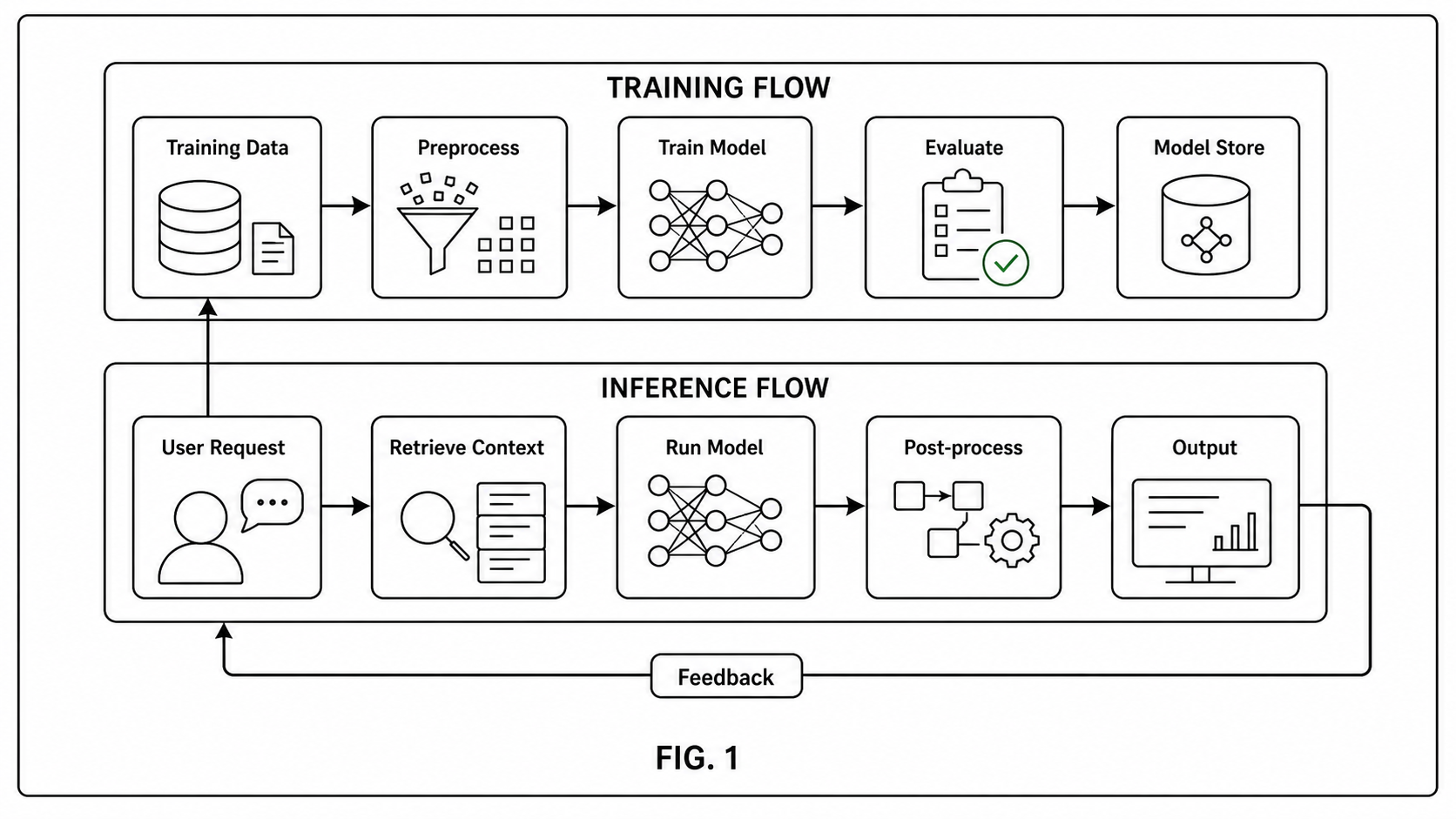
Training Flow
A training figure may show:
- data source
- preprocessing
- feature extraction
- training module
- evaluation
- model store
- update or feedback loop
Do not use a visual figure as a substitute for mathematical precision in the written disclosure. Use the drawing to orient the reader, then define the method in text.
For a training invention, the figure should make the source of change visible. If the novelty is in how examples are filtered, show the filtering module. If the novelty is in model updating, show the model store, update trigger, validation step, and rollback or deployment path. If the novelty is a privacy-preserving training method, show the device boundary and the data that does not leave the device.
Inference Flow
An inference figure may show:
- request input
- retrieval or context builder
- model execution
- post-processing
- output device or API
- logging or feedback
For system boundaries and module relationships, pair this page with the patent block diagram generator.
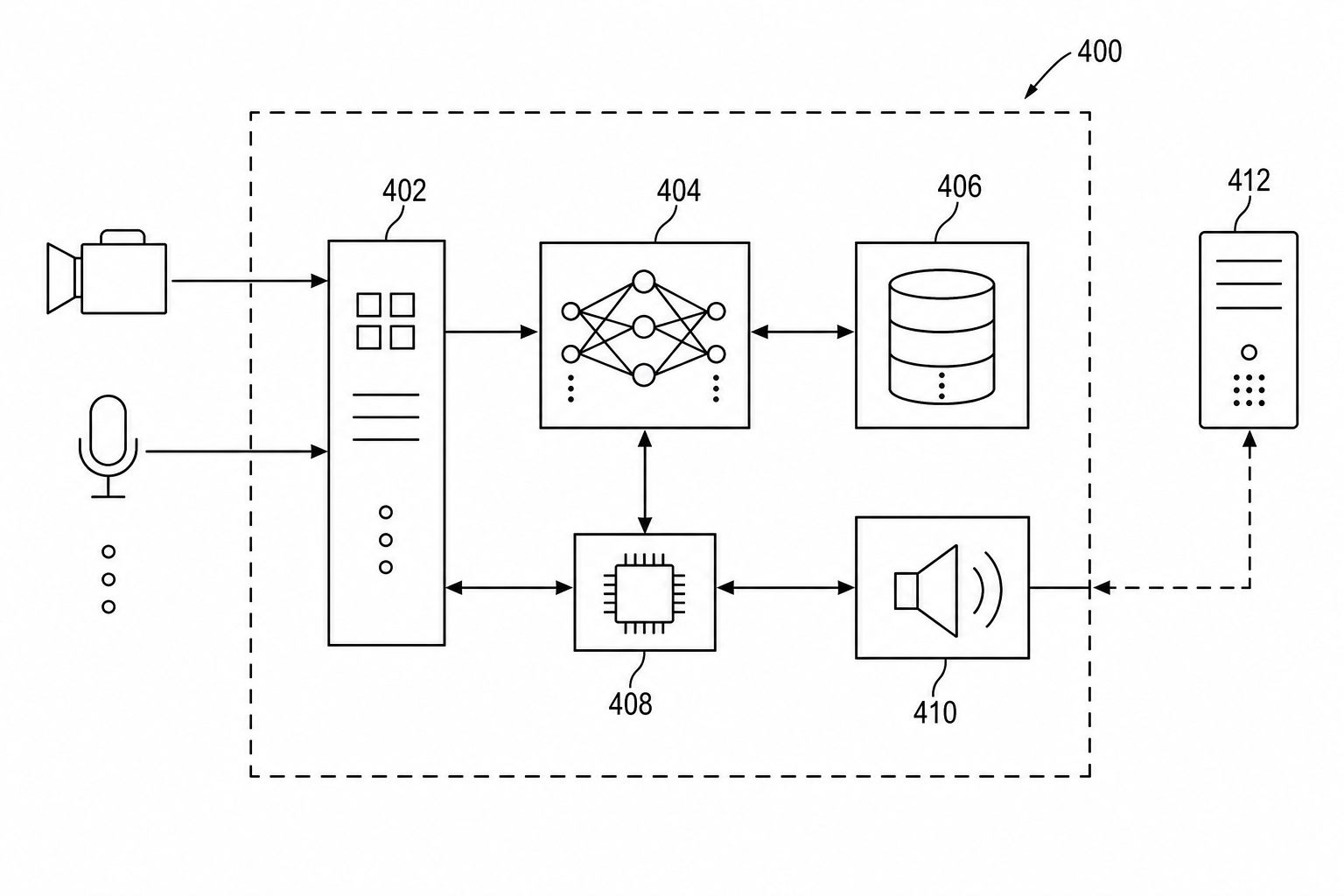
Inference figures should separate what happens before the model, inside the model execution path, and after the model. For example, a useful patent figure may show an input parser, context builder, model execution module, confidence scoring module, post-processor, output interface, and feedback logger. That is more useful than a screenshot of the product or a single "LLM" box.
RAG And Agent Workflows
RAG and agent systems often need explicit retrieval, tool, memory, planner, and verifier blocks. Keep the names short, then use the written specification for detail.
Before export, check that each figure has stable numbering and that every module is supported by the disclosure.
Example Figure Set For An AI Filing
| Figure | What it should show | When to use it |
|---|---|---|
| System block diagram | Devices, servers, model store, memory, data stores, interfaces | When the invention has multiple modules or deployment boundaries |
| Training workflow | Data selection, preprocessing, training, evaluation, model update | When the invention changes how the model is trained or maintained |
| Inference workflow | Request, context building, model execution, post-processing, output | When the invention changes runtime behavior |
| RAG / agent diagram | Retriever, memory, planner, tools, verifier, response module | When orchestration is part of the invention |
| UI or output figure | What the user or downstream system receives | When the output format affects the claimed method |
This set keeps each figure readable. The overview can stay broad, while training and inference figures carry the ordered logic.
Prompt Template For PatentFig AI
Use a source prompt like this when drafting the first version:
Create a patent-style AI system figure for a [type of invention].
Show these modules: [input], [data source], [preprocessing], [training or inference module], [model store], [output interface], [feedback loop].
Use black-and-white line art, readable labels, reference numerals, and arrows showing data flow.
Do not create a marketing dashboard or product screenshot.
Keep implementation details abstract unless they are part of the invention.
For RAG or agent workflows, add:
Include a retriever, context store, planner, tool execution module, verifier, model execution module, and response output.
Show which data is retrieved, which step verifies it, and where the final response is generated.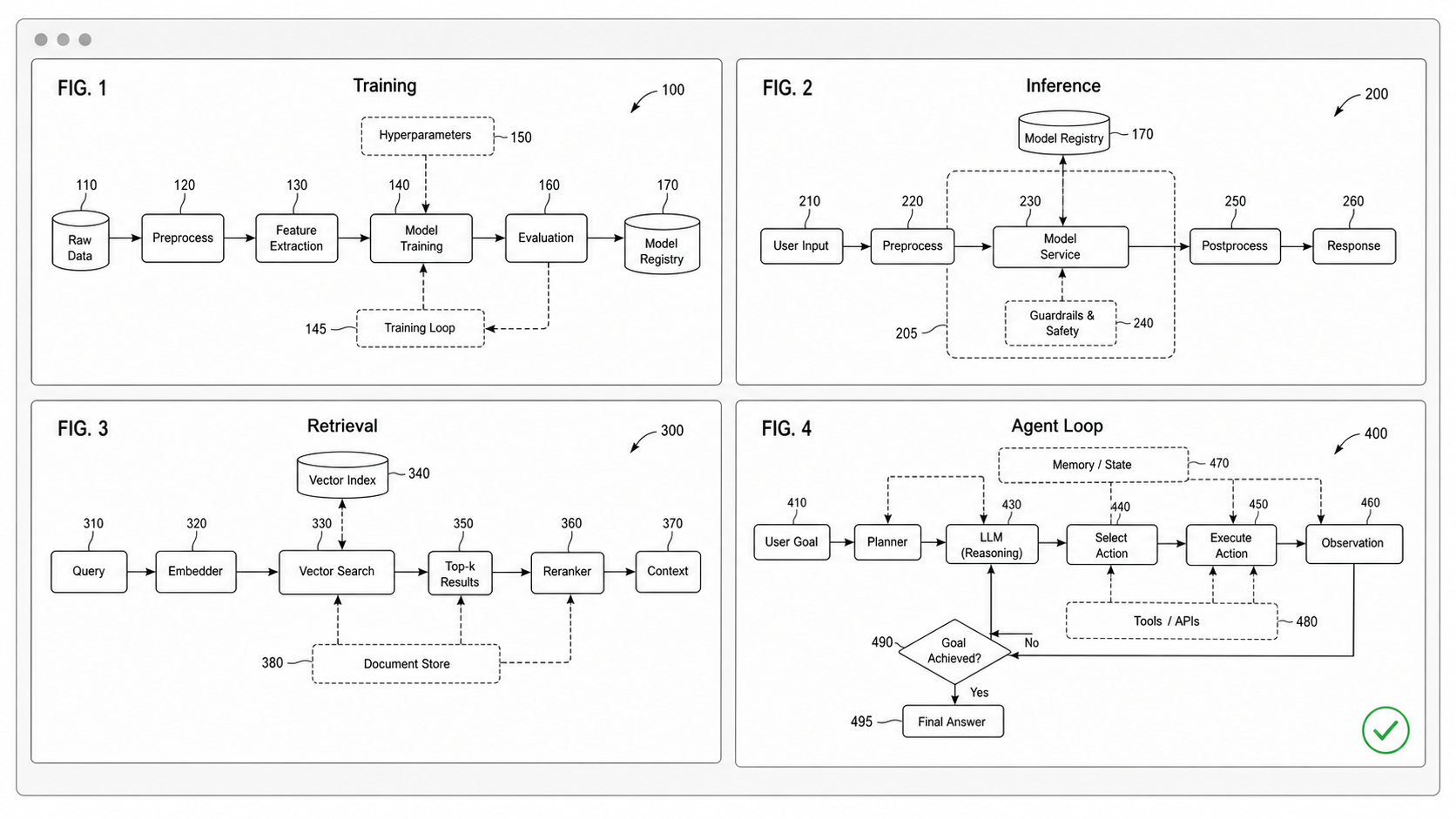
Before Export: Review Checklist
| Check | What to verify |
|---|---|
| Module names | Each box has a short technical name, not a marketing phrase |
| Claim support | Every important module is described in the specification |
| Figure separation | Architecture, training, inference, and UI are not forced into one crowded figure |
| Arrows | Each arrow has a clear data, control, or feedback meaning |
| Reference numerals | Numerals are readable and reused consistently across related figures |
| Boundaries | Device, server, cloud, memory, and model-store boundaries are clear |
| Export | Final line work, margins, and black-and-white mode are checked before filing |
Run final drawings through the Figure Checker before export, especially when you have several related AI figures with repeated module names.
How Different Readers Should Use This Guide
- Patent attorney: use the table above to decide whether the disclosure needs separate training, inference, and system figures.
- Patent engineer: start from the actual pipeline and remove implementation noise that does not support the invention.
- Founder or product lead: use the prompt template to turn a product concept into a figure draft before counsel reviews it.
- Operations team: keep an editable master set so labels, numerals, and figure order can be revised without redrawing everything.
When the AI Patent Figure Is Done
An AI patent figure is finished when three things are true: every box and arrow corresponds to claim language; the figure set separates training from inference rather than collapsing both into one diagram; and a reviewer can trace data flow without asking which arrow means "data" versus "control." If any of those is still ambiguous, the figure needs another iteration before export.
Open the AI / ML patent diagram generator.
Next step: Open the generator and try this workflow with your own source material — or browse patent drawing examples for a starting point.
Author

Categories
More Posts
Software Patent Diagrams: Architecture, Flowcharts, UI Screens, and AI Systems
Plan software patent figure sets across architecture diagrams, method flowcharts, UI figures, AI pipelines, and export review.
Patent Block Diagram Examples for Software, Hardware, and AI Systems
How to structure patent block diagrams for software systems, hardware products, AI workflows, networked devices, and platform inventions.
How to Turn Software Architecture Into Patent Flowcharts
Turn software architecture into USPTO-compliant patent flowcharts with AI. Method steps, system diagrams, and Section 112 safeguards in one workflow.
Newsletter
Join the community
Subscribe to our newsletter for the latest news and updates