Block Diagram Maker for Patent Figures
Create patent-ready figures for block diagrams, system diagrams, module relationships, and hardware/software architecture overviews.
- Start from a block diagram, system description, architecture sketch, README, or claim outline.
- Generate clean black-and-white labeled block and system diagrams on a pure white background that meet USPTO §1.84 / CNIPA figure rules, with numbered modules, connectors, boundaries, and information flow.
- Refine labels, arrows, view layout, and figure structure through focused iterations.
- Connect the result to Figure Checker, export tools, and the broader patent drawing workflow.
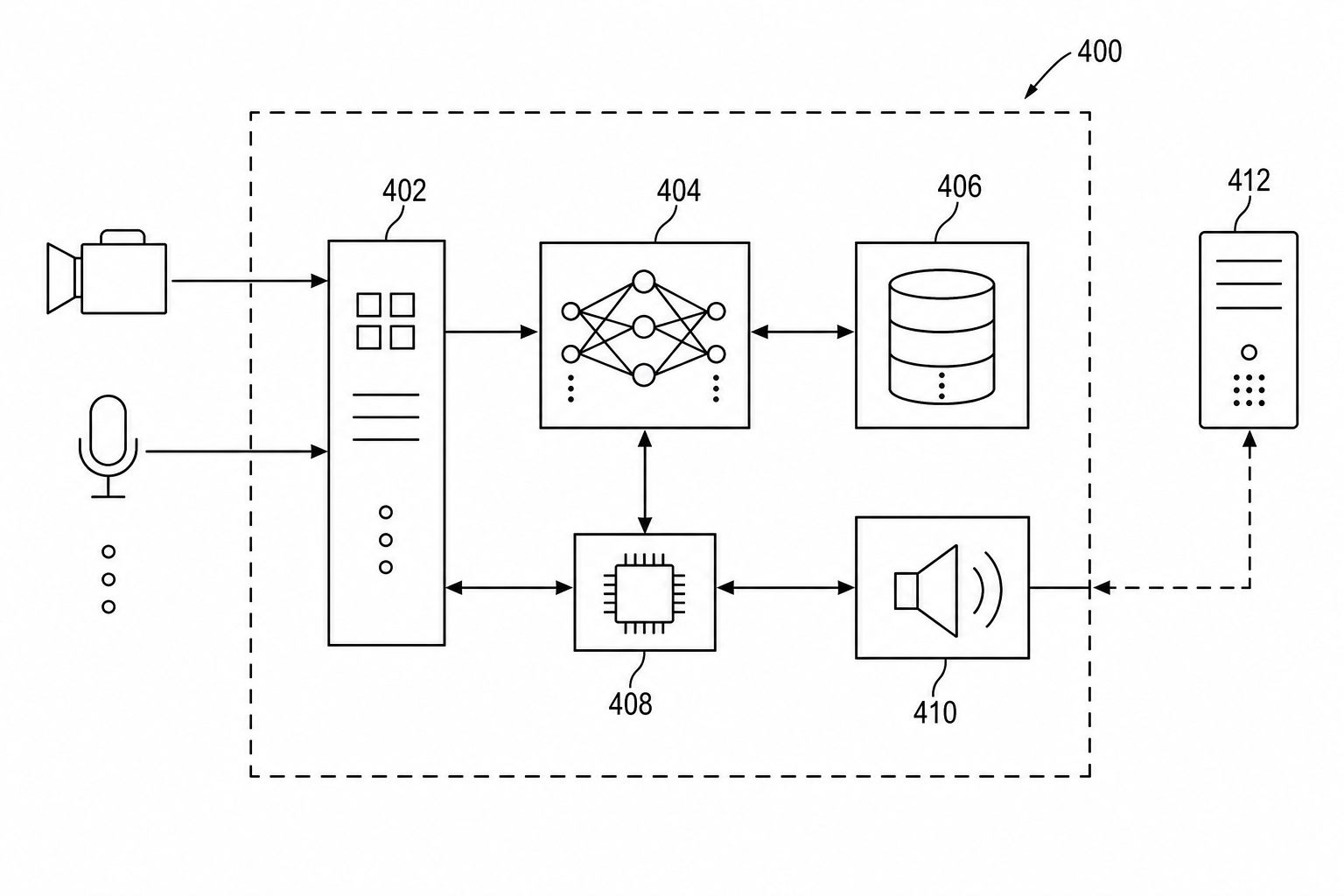
Patent block diagram examples
Fictional inventions in filing style. Open one to pre-fill the generator and adapt it.
A practical generation flow
Block Diagram Maker for Patent Figures is organized around source preparation, figure generation, revision, and final review.
1
Prepare the source
Use a block diagram, system description, architecture sketch, README, or claim outline with enough structure for PatentFig AI to infer the drawing relationships.
2
Generate the figure
Create clean black-and-white labeled block and system diagrams on a pure white background that meet USPTO §1.84 / CNIPA figure rules, with numbered modules, connectors, boundaries, and information flow with patent-style composition, line work, and reference structure.
3
Check and export
Use review and export tools once the layout, labels, and file format are stable.
Why this workflow needs a patent-specific tool
Generic image tools do not consistently handle block diagrams, system diagrams, module relationships, and hardware/software architecture overviews with the structure patent drawings need.
Patent-first structure
The workflow emphasizes readable parts, relationships, and reference numerals for block diagrams, system diagrams, module relationships, and hardware/software architecture overviews.
Iteration without restarting
Adjust the figure prompt, regenerate focused views, and keep the surrounding workflow stable.
Review before export
Check visual clarity, margins, line work, labels, and file readiness before downstream filing work.
Common mistakes in patent block diagrams
Treating the block diagram as a deployment diagram with vendors, regions, and infrastructure detail.
Boxes either too broad ("system") or too implementation-specific ("PostgreSQL 15.2").
Arrows that mix data, control, power, and user input without distinction.
Skipping companion flowcharts or detail views when the block diagram has too much in one frame.
Block Diagram Maker for Patent Figures
Block Diagram Maker for Patent Figures FAQ
Open Block Diagram Maker for Patent Figures
Start in PatentFig AI, generate clean black-and-white labeled block and system diagrams on a pure white background that meet USPTO §1.84 / CNIPA figure rules, with numbered modules, connectors, boundaries, and information flow, then review and export the figure set.
Related workflows
Detailed guide
Read the Block Diagram Maker for Patent Figures workflow article.
Patent drawing tools
Browse every PatentFig AI generator, checker, and converter.
Patent drawing examples
Browse sample patent drawings across every category.
Check figure compliance
Review DPI, line work, margins, color mode, and readability.
Software Patent Diagram Generator
Create patent-ready figures for method flowcharts, system block diagrams, data-flow diagrams, and state-transition diagrams for software inventions.
Neural Network Diagram Maker
Create patent-ready figures for neural network diagrams, AI architecture figures, ML pipelines, training flows, inference systems, and agent workflows.