Software Patent Diagram Generator
Turn software behavior into separate structural and procedural figures that support the claims.
- Four native logic-diagram families
- README, claims, architecture notes, or diagrams as input
- Functional module names instead of vendor branding
- Separate structure, data movement, behavior, and method views
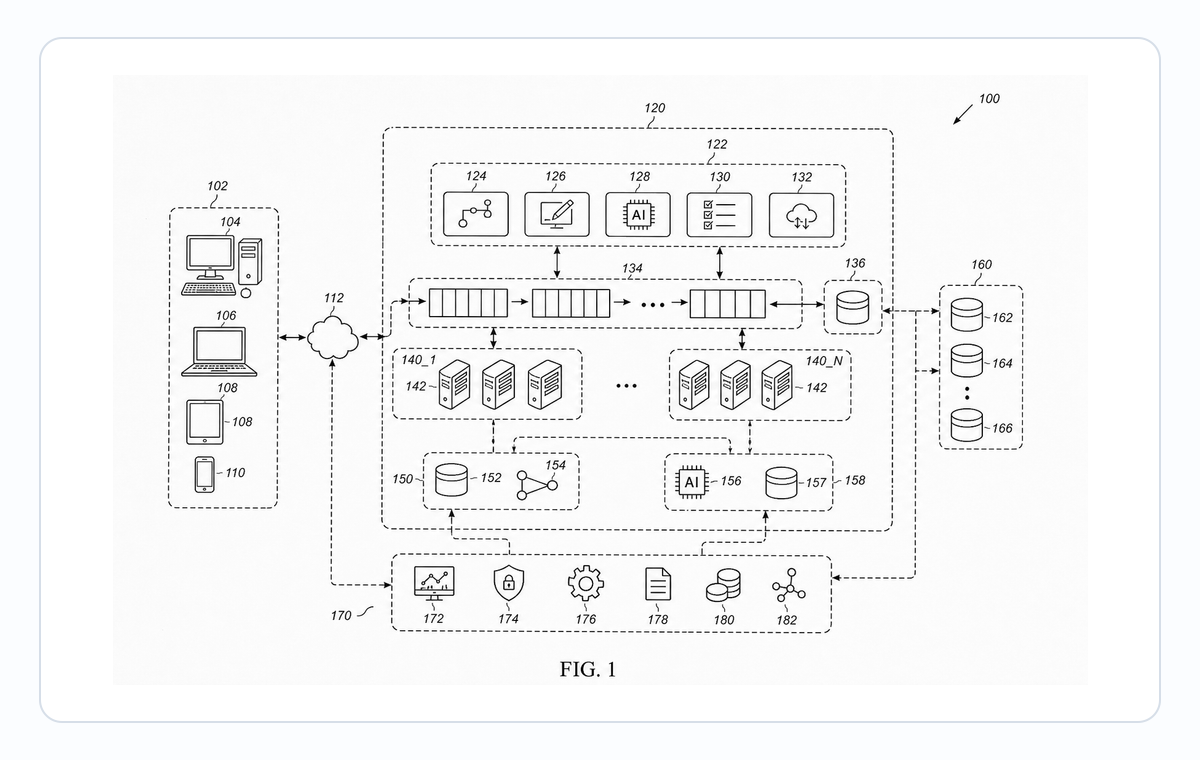
Choose the diagram by claim type
- Use a system block diagram for components, a data-flow diagram for information movement, a state-transition diagram for behavior, and a method flowchart for ordered steps.
- UML, sequence, ER, and use-case diagrams can be used as source references; they are converted into the closest patent-oriented native figure rather than exposed as separate dedicated modes.
Software patent diagram examples
Fictional inventions in filing style. Open one to pre-fill the generator and adapt it.
Match each claim to a native diagram family
A software filing is clearer when architecture, information flow, state behavior, and method order are not forced into one page.
1
System block diagram
Show major functional modules, subsystem boundaries, and primary interconnections for system or apparatus claims.
2
Data-flow or state-transition diagram
Choose data flow when movement and transformation matter; choose state transition when events and state changes define behavior.
3
Method flowchart
Use ordered action steps and decision branches for method claims, with S100-style numbering when step labels are enabled.
Convert product documentation into patent language
Product diagrams optimize for implementation and presentation; patent figures should emphasize stable functions and claimed relationships.
Remove implementation branding
Replace vendor and product names with durable functional roles unless a specific implementation is genuinely part of the disclosure.
Split overloaded source diagrams
Separate deployment, architecture, user interface, and method behavior into companion figures instead of shrinking one product slide.
Keep labels and numerals stable
Use short module names inside shapes and consistent external numerals that the specification can cite across figures.
Common mistakes in software patent diagrams
Pasting the product architecture slide directly into the patent application — branding and vendor names count as extraneous matter.
Naming modules with implementation labels ("Stripe webhook", "OpenAI endpoint") instead of stable functional names.
Forcing architecture, method, and UI into one diagram instead of splitting them into companion figures.
Omitting reference numerals because "the modules are obvious from the names."
Software Patent Diagram Generator
Software Patent Diagram Generator FAQ
Create the software patent figure set
Start from the claim outline or architecture note, then generate separate figures for structure, data, state, and method where needed.
Related workflows
Detailed guide
Read the Software Patent Diagram Generator workflow article.
Patent drawing tools
Browse every PatentFig AI generator, checker, and converter.
Patent drawing examples
Browse sample patent drawings across every category.
Check figure compliance
Review DPI, line work, margins, color mode, and readability.
Medical Device Patent Drawing Generator
Create patent-ready figures for catheters, stents, implants, auto-injectors, wearables and patches, surgical instruments, cross-sections, and exploded assemblies.
Automotive patent drawings
Powertrain, EV battery, ADAS, and wiring-harness figures, filing-ready.