Medical Device Patent Drawing Generator
Create patent-ready figures for catheters, stents, implants, auto-injectors, wearables and patches, surgical instruments, cross-sections, and exploded assemblies.
- Start from a device description, prototype image, cross-section request, or clinical hardware sketch.
- Generate black-and-white line-art medical device figures — use-state views (deployed and retracted), cross-sections, and exploded assemblies — on a pure white background, with reference numerals placed outside the part and connected by squiggly lead lines, no clinical or anatomical realism beyond what the claims need.
- Refine labels, arrows, view layout, and figure structure through focused iterations.
- Connect the result to Figure Checker, export tools, and the broader patent drawing workflow.
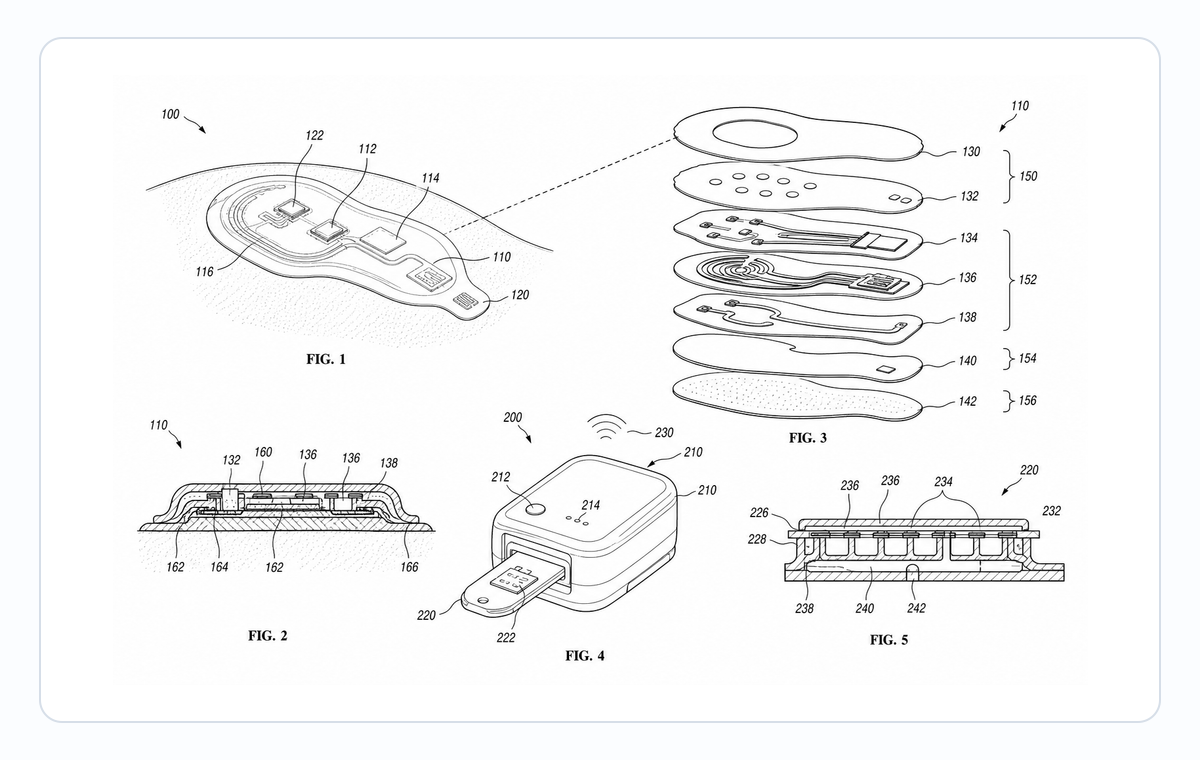
Medical device patent drawing examples
Fictional inventions in filing style. Open one to pre-fill the generator and adapt it.
A practical generation flow
Medical Device Patent Drawing Generator is organized around source preparation, figure generation, revision, and final review.
1
Prepare the source
Use a device description, prototype image, cross-section request, or clinical hardware sketch with enough structure for PatentFig AI to infer the drawing relationships.
2
Generate the figure
Create black-and-white line-art medical device figures — use-state views (deployed and retracted), cross-sections, and exploded assemblies — on a pure white background, with reference numerals placed outside the part and connected by squiggly lead lines, no clinical or anatomical realism beyond what the claims need with patent-style composition, line work, and reference structure.
3
Check and export
Use review and export tools once the layout, labels, and file format are stable.
Why this workflow needs a patent-specific tool
Generic image tools do not consistently handle catheters, stents, implants, auto-injectors, wearables and patches, surgical instruments, cross-sections, and exploded assemblies with the structure patent drawings need.
Patent-first structure
The workflow emphasizes readable parts, relationships, and reference numerals for catheters, stents, implants, auto-injectors, wearables and patches, surgical instruments, cross-sections, and exploded assemblies.
Iteration without restarting
Adjust the figure prompt, regenerate focused views, and keep the surrounding workflow stable.
Review before export
Check visual clarity, margins, line work, labels, and file readiness before downstream filing work.
Common mistakes in medical device patent figures
Reusing IFU illustrations or marketing renderings that include warning glyphs, color coding, or patient-identifying detail.
Adding clinical realism (skin, tissue) when the invention is the device, not the use environment.
Cross-sections that invent internal geometry not actually supported by the disclosure.
Showing a cartridge or consumable installed in only one orientation when the claim covers reversible installation.
Medical Device Patent Drawing Generator
Medical Device Patent Drawing Generator FAQ
Open Medical Device Patent Drawing Generator
Start in PatentFig AI, generate black-and-white line-art medical device figures — use-state views (deployed and retracted), cross-sections, and exploded assemblies — on a pure white background, with reference numerals placed outside the part and connected by squiggly lead lines, no clinical or anatomical realism beyond what the claims need, then review and export the figure set.
Related workflows
Detailed guide
Read the Medical Device Patent Drawing Generator workflow article.
Patent drawing tools
Browse every PatentFig AI generator, checker, and converter.
Patent drawing examples
Browse sample patent drawings across every category.
Check figure compliance
Review DPI, line work, margins, color mode, and readability.
Automotive patent drawings
Powertrain, EV battery, ADAS, and wiring-harness figures, filing-ready.
Mechanical Drawing Generator for Patents
Create patent-ready figures for mechanical drawings, technical drawings, device structures, housings, cross-sections, and hardware assemblies.