CAD Drawing to Patent Figure Converter
You already modeled the invention — the patent figure is one export away. Capture each CAD drawing from SolidWorks, Fusion 360, AutoCAD, or FreeCAD, upload it, and PatentFig AI converts every view into filing-ready line art with reference numerals.
- Works from CAD view exports
- Numerals + leader lines added
- Shading converted to line art
- Six-office checking
The 30-second answer
- Export the views you need from your CAD tool as images — screenshots or rendered viewports work — then upload them to PatentFig AI to get compliant line art with reference numerals.
- PatentFig AI does not import STEP/STL/IGES files directly; it converts the view images your CAD software already exports.
- If your only need is automatic standard-view sets from a native CAD file, a CAD-native automation tool fits better; for everything else — edits, detail views, flowcharts, multi-office checks — use this workflow.
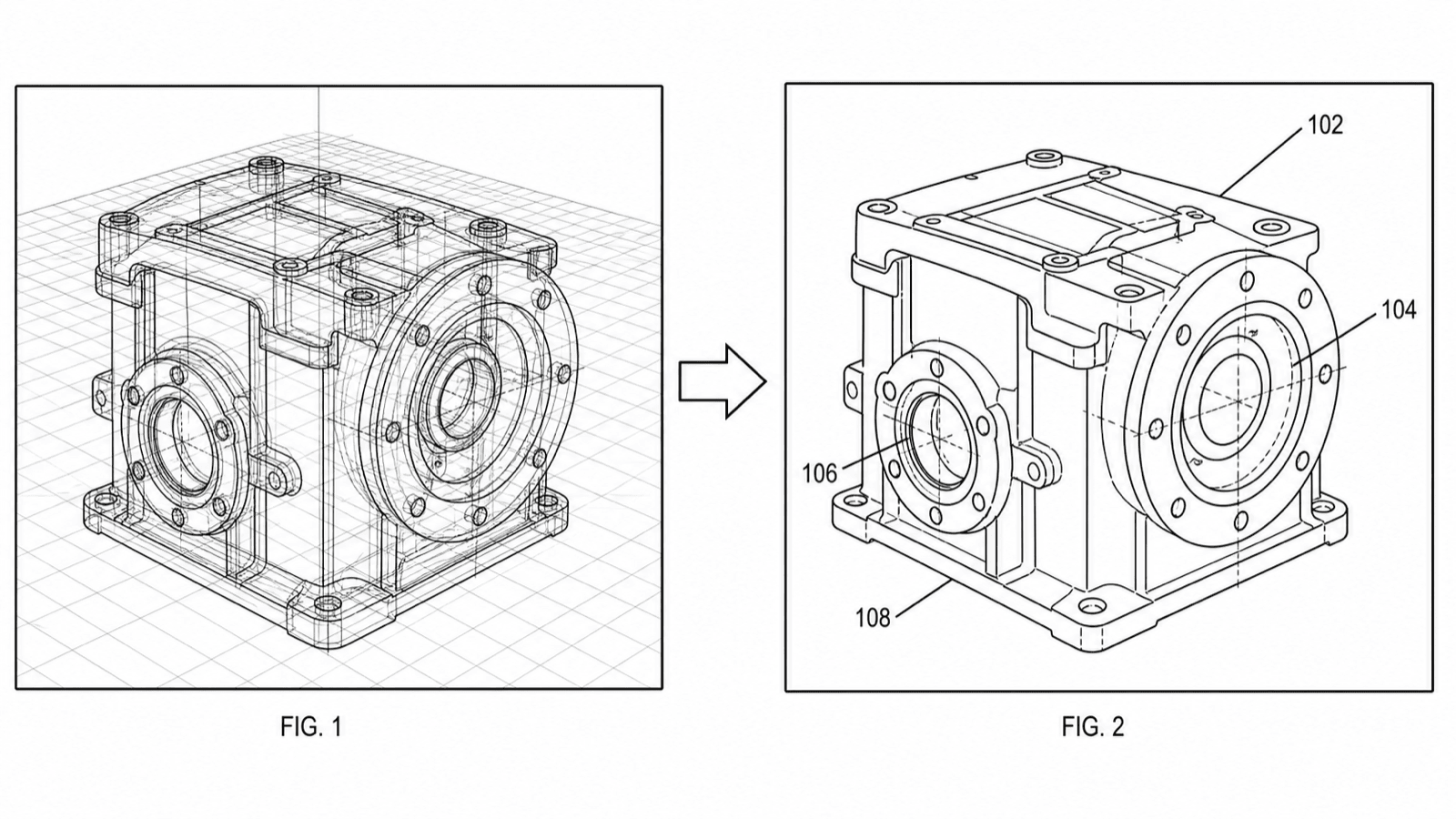
CAD export in, patent figure out
A typical shaded CAD viewport converted to USPTO-style line art.
From your CAD tool to a patent figure
Every major CAD package can hand you the input image in under a minute.
1
SolidWorks to patent drawing
Create a drawing sheet from the model (File → Make Drawing), place the views you need, and save as PNG or PDF — or simply screenshot the shaded viewport at the angle you want.
2
Fusion 360 to patent drawing
Use the Drawing workspace to project front, side, top, and isometric views, then export the sheet — or capture the canvas with the in-app image export.
3
AutoCAD to patent drawing
Plot the layout to PNG or PDF, or use EXPORT for an image of the model-space view; isometric presets give you the perspective input quickly.
4
FreeCAD to patent drawing
The TechDraw workbench projects standard views onto a page you can export as an image — or screenshot the 3D viewport with the model oriented as needed.
What the AI adds that a CAD export lacks
The viewport image is the input; the patent figure is what comes out.
Uniform line weights
CAD exports carry anti-aliased, variable-weight edges; the AI redraws them as the solid, uniform black lines offices require.
Reference numerals and leader lines
Each functional part gets a numeral connected by a leader line — and the same part keeps the same numeral across every view.
Shading removed, hatching applied
Gradient and lighting shading is converted to clean outlines, with section hatching where a cut surface needs it.
Multi-office compliance check
The finished figures run through the checker against USPTO, CNIPA, EPO, JPO, KIPO, and PCT rules before you file.
Native-CAD automation vs. PatentFig AI
Two honest answers to "CAD to patent drawing" — pick by what you need out, not just what you have in.
Native-CAD automation
PatentFig AI
Input
Native CAD files (STEP/STL/IGES/X_T)
View exports, screenshots, renders — plus photos, sketches, text
Standard view sets
Strong — ~21 views generated automatically
Generated per view from the images you choose
Figure types beyond views
Not the focus
Flowcharts, block diagrams, exploded details, design sets
Editing
Regenerate from the model
Chat-to-modify individual figures
Compliance checking
USPTO-oriented
Built-in checker for six offices
Pricing
Per-token
Free tier; $50/mo · 500 credits · ~50 figures (~$1 each)
This workflow is the better fit when
- You can export or screenshot views from your CAD tool in seconds
- You need numerals, leader lines, and FIG. labels added — not just views
- The application also needs flowcharts, block diagrams, or detail figures
- You expect revision rounds — chat edits beat re-exporting from CAD
A native-CAD tool wins when
- You want a full ~21-view orthographic set generated automatically from a STEP file
- Batch CAD-to-views automation with DXF output is the entire job
- Nobody can open the CAD model to export views at all
CAD drawing converter
CAD to patent drawing FAQ
Your CAD model is 90% of the work
Export a view, upload it, and get a compliant patent figure with numerals — in minutes, not days.
Related tools and guides
Guide: the CAD → SVG → TIFF patent drawing workflow
The full export pipeline, format by format, from model to filing.
Patent drawing generator
Generate a patent drawing from a text description.
Utility patent drawing generator
Generate utility figures with reference numerals.
Vectorize
Convert raster figures to SVG, DXF or vector PDF.
Figure checker
Validate figures against office rules before filing.
Patent drawing examples
Browse sample patent figures across every category.