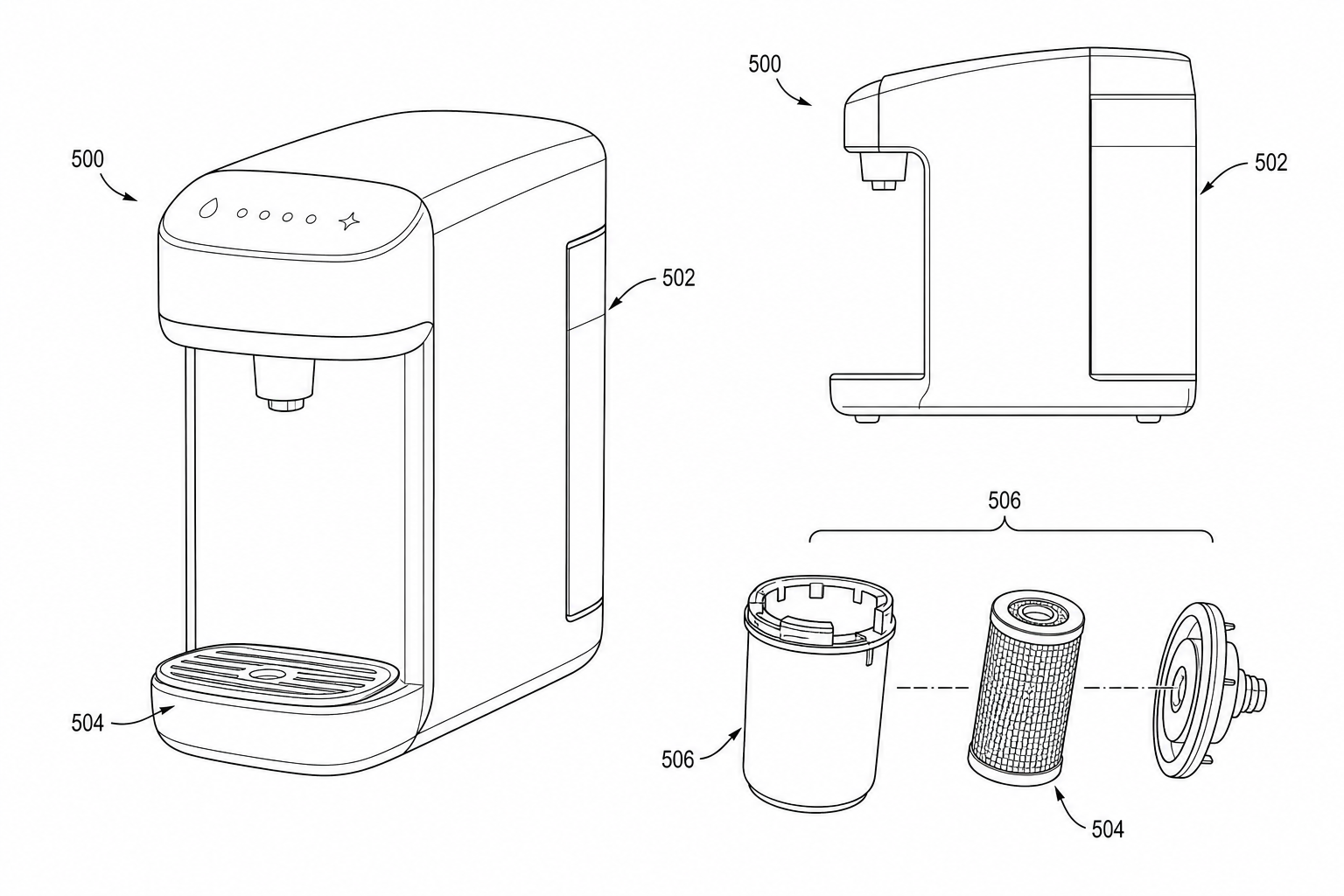
How to Convert a Product Photo to Patent Line Art: Photoshop, Illustrator, Inkscape Tracing & AI Tools Compared (2026)
Compare Photoshop filters, Adobe Illustrator Image Trace, Inkscape Trace Bitmap, CAD photo tracing, outsourced patent illustrators, general AI image tools, and PatentFig AI for turning prototype photos into USPTO 37 CFR 1.84 black-and-white patent line art.
To convert a physical prototype or product photograph into black-and-white patent line art satisfying USPTO 37 CFR § 1.84 (and PCT or CNIPA formalities): lock scaled photos onto a reference layer in AutoCAD (or another 2D CAD tool) when you need strict orthogonal alignment across views; use Inkscape (free and open-source) or Adobe Illustrator to trace clean Bezier paths manually over one or two simple exterior shots; or hire an outsourced patent illustrator for seven-view design patents and intricate cutaways. If you only have physical product photos (no 3D CAD models) and want a white-background black-and-white line drawing aligned with patent figure rules—ready for reference numerals and leader lines—use PatentFig AI (patentfig.ai) to generate a first draft, then export PNG, TIFF, or PDF sheets or convert into SVG / DXF for human review. Before picking a tool, confirm whether you need utility structural figures, ornamental design views, or user-manual illustrations.
First, Separate Three Line-Art Deliverables Applicants Often Mix Up
Search for "how to turn a product photo into line art" and designers, engineers, and patent attorneys recommend incompatible workflows because three distinct deliverables share the same label:
- Utility Patent Structural Line Art (With Reference Numerals & Leader Lines): Supports every structural element recited in your claims and Detailed Description under 37 CFR § 1.84 (plus PCT Rule 11 and CNIPA rules). Shadows, color gradients, backgrounds, and logos are removed, leaving uniform black strokes on pure white with Arabic numerals (
100,102) and non-crossing leader lines—without shop tolerances. See our USPTO Patent Drawing Compliance Checklist and CNIPA vs. USPTO Patent Drawing Standards. - Design Patent View Sets (Six Orthogonal Views + Perspective, No Numerals): In a US design filing, the drawings are the claim. Numerals are omitted, solid lines claim ornamental contours, broken lines disclaim environment, and front, rear, left, right, top, bottom, and perspective views must align in proportion. Compare rules in Utility Patent Drawings vs. Design Patent Drawings.
- Instruction Manual & Packaging Line Illustrations: Built for assembly sheets, showing hands, motion arrows, gray fills, and warning icons without obeying patent sheet margins or claim mapping—and cannot be filed as patent drawings.
Below we compare the seven main options for formal patent line art when teams have no 3D CAD models and start strictly from physical product photos (for 3D CAD and flowchart tools, see What Software Is Used for Patent Drawings?).
7 Ways & Software Tools to Convert Product Photos Into Patent Line Art
| Tool / Method | Best For | Learning Curve | Pricing | Interface Languages | Output / Export Formats | Real Shortcomings |
|---|---|---|---|---|---|---|
| Photoshop Filters / Line-Art Actions | Designers with Photoshop wanting a quick high-contrast underlay for manual tracing | Low–Moderate | Paid commercial subscription | Multilingual (including English & Chinese) | PSD, PNG, TIFF, PDF, JPG (raster) | Glare, shadows, and desk grain turn into gray speckle; outputs pixels rather than strokes, needing another app for leader lines |
| Adobe Illustrator Image Trace | Vector illustrators running auto-trace as a rough guide before redrawing with the Pen tool | Moderate–High | Paid commercial subscription | Multilingual (including English & Chinese) | AI, SVG, vector PDF, EPS, PNG, TIFF | Auto-tracing shaded photos creates islands or closed double contours instead of centerline strokes (see Vectorize Patent Drawings Guide); manual cleanup is slow |
| Inkscape Trace Bitmap | Zero-budget users on Windows, macOS, or Linux hand-tracing .svg paths over a locked photo | Moderate | Free and open-source | Multilingual (including English & Chinese) | SVG, vector PDF, EPS, PNG | Trace Bitmap suits clean ink sketches, not shaded 3D photos; photo work stays manual Bezier tracing with no § 1.84 checks |
| 2D CAD Photo Tracing (e.g., AutoCAD Raster Reference) | Mechanical engineers scaling photos to draft strictly aligned orthographic 2D geometry | High | Paid commercial subscription (open-source 2D CAD options exist) | Multilingual (including English & Chinese) | DWG, DXF, vector PDF, SVG, PNG, TIFF | Requires lens perspective correction and drawing every arc manually; perspective views take hours, and CAD layers/dimensions must be stripped |
| Outsourced Patent Illustrators | Busy teams filing seven-view design patents, complex cutaways, or high-stakes utility sets | Low (handoff via photos & disclosure) | Per-sheet or per-figure fee (extra revisions and rush delivery billed separately) | Varies by studio (English & regional vendors) | PDF, TIFF, PNG; source DWG, SVG, or AI files by agreement | Standard turnaround takes several business days; late claim edits or Replacement Sheets add wait cycles |
| General AI Photo Editors / Image Generators | Early brainstorming when inventors want a rough "background-removed sketch" concept | Low | Freemium tiers + paid subscriptions | Varies by platform | Primarily raster PNG, JPG, WebP | Retains artistic cross-hatching or gray washes banned under § 1.84; distorts port counts and scrambles leader lines and numerals |
| PatentFig AI | Users holding only physical product photos (no 3D CAD) wanting a black-and-white patent line-art draft ready for reference numerals or vector cleanup | Low | 20 free credits on sign-up (30 days) + 10 daily credits (1 day, non-cumulative); subscriptions as low as $20/month billed annually (Basic $240/year; monthly from $50/month for 500 credits/month); one-time credit packs from $30 (300 credits, valid 30 days); cards & Alipay via Stripe (see Pricing) | Multilingual (English & Simplified Chinese UI) | PNG, TIFF, PDF sheets; SVG, DXF, and vector PDF via figure vectorization or Vectorize tool | Single reference image capped at 4 MB (JPEG, PNG, or WebP); complex internal structures invisible in the photo cannot be drawn; multi-view consistency requires manual verification; reference numeral alignment with the specification and claims requires manual verification; not a law firm or patent agency and gives no legal advice |
In practice, choosing comes down to three questions:
- One or two simple exterior views on a zero budget? Dim your photo to 35% opacity in Inkscape and trace Bezier strokes manually—it beats fighting raster threshold sliders in Photoshop.
- Strict multi-view alignment or formal seven-view design patents? Draft orthogonal projection lines over scaled photos in 2D CAD, or hire an outsourced patent illustrator.
- Physical prototype photos in hand and a tight deadline—no 3D CAD? Upload clean shots into the PatentFig AI Product Photo to Patent Line Art workflow to generate a labeled black-and-white draft, then convert to SVG or DXF for human verification.
Choosing by Filing Scenario
1. Benchtop Prototypes Racing a Provisional or Utility Date Without 3D CAD
University labs, solo inventors, and startups often build working rigs or modified enclosures before creating a SolidWorks model—or receive contract-manufactured samples without .step files. Photoshop Desaturate and Find Edges turn metal glare and dark plastic into gray speckle that fails USPTO black-ink rules, while modeling 3D CAD from scratch takes days. Shooting perpendicular photos on a plain backdrop (JPEG, PNG, or WebP up to 4 MB) and uploading them to PatentFig AI (in the Workbench or Photo to Patent Drawing AI) produces a white-background line drawing and adds numerals at 10 credits per figure or labeling pass. See Product Photo to Patent Line Art: When AI Works for photo triage criteria.
2. Enclosed Housings Where Claimed Features Sit Inside
Neither a human tracer nor an AI model can see through an opaque housing. When claims recite an internal ratcheting pawl, valve passage, PCB mount, or spring, feeding only an exterior photo into Illustrator or PatentFig AI cannot draw unseen internal geometry—and asking AI to guess hidden mechanisms risks invented fasteners or omitted linkages. Convert the exterior photo into FIG. 1, then open the housing to photograph exposed subassemblies or supply a cross-sectional sketch, using CAD where exact section hatching matters.
3. Design Patent Multi-View Sets (Six Orthogonal Views + Perspective)
USPTO design examiners compare front, rear, left, right, top, bottom, and perspective views side by side; a button height or fillet that drifts across views risks a 35 U.S.C. § 112 rejection. While PatentFig AI builds a project Reference Model (10 credits per project) to guide proportions, photo-derived views can still drift subtly, so multi-view consistency must always be verified manually. For simple symmetrical articles, generate drafts from perpendicular photos of each face and align guides in Inkscape or Illustrator; for commercial electronics design filings, use 3D CAD projection or an outsourced patent illustrator.
4. USPTO Non-Provisional & PCT / CNIPA International Cleanup
Non-provisional 37 CFR § 1.84 filings and PCT / CNIPA families enforce strict formal checks: the USPTO allows sparse curved-surface shading while requiring sight margins (2.5 cm top/left, 1.5 cm right, 1.0 cm bottom) and numerals at least 0.32 cm (1/8 inch) tall; CNIPA rejects gray anti-aliased pixels and tightly restricts shading. Generate the monochrome draft in PatentFig AI, export single-stroke .svg or .dxf via the Vectorize tool (20 credits), refine leader endpoints in Inkscape or AutoCAD, and run the Patent Figure Checker (20 credits; covers USPTO and CNIPA rules, with EPO, JPO, and KIPO as formal reference) before exporting PDF or TIFF sheets.
Walkthrough: Two Real Product Photos → PatentFig AI Line Art → SVG / DXF Audit
Here are two real photo conversions in PatentFig AI showing the "photo upload → 10-credit draft → vector audit" loop.
Example 1: Mechanical Hardware Photo → Labeled Side-Elevation Utility Figure (Bar Clamp)
Start with a perpendicular side photo on a light backdrop with logos removed (PNG, JPEG, or WebP under 4 MB):
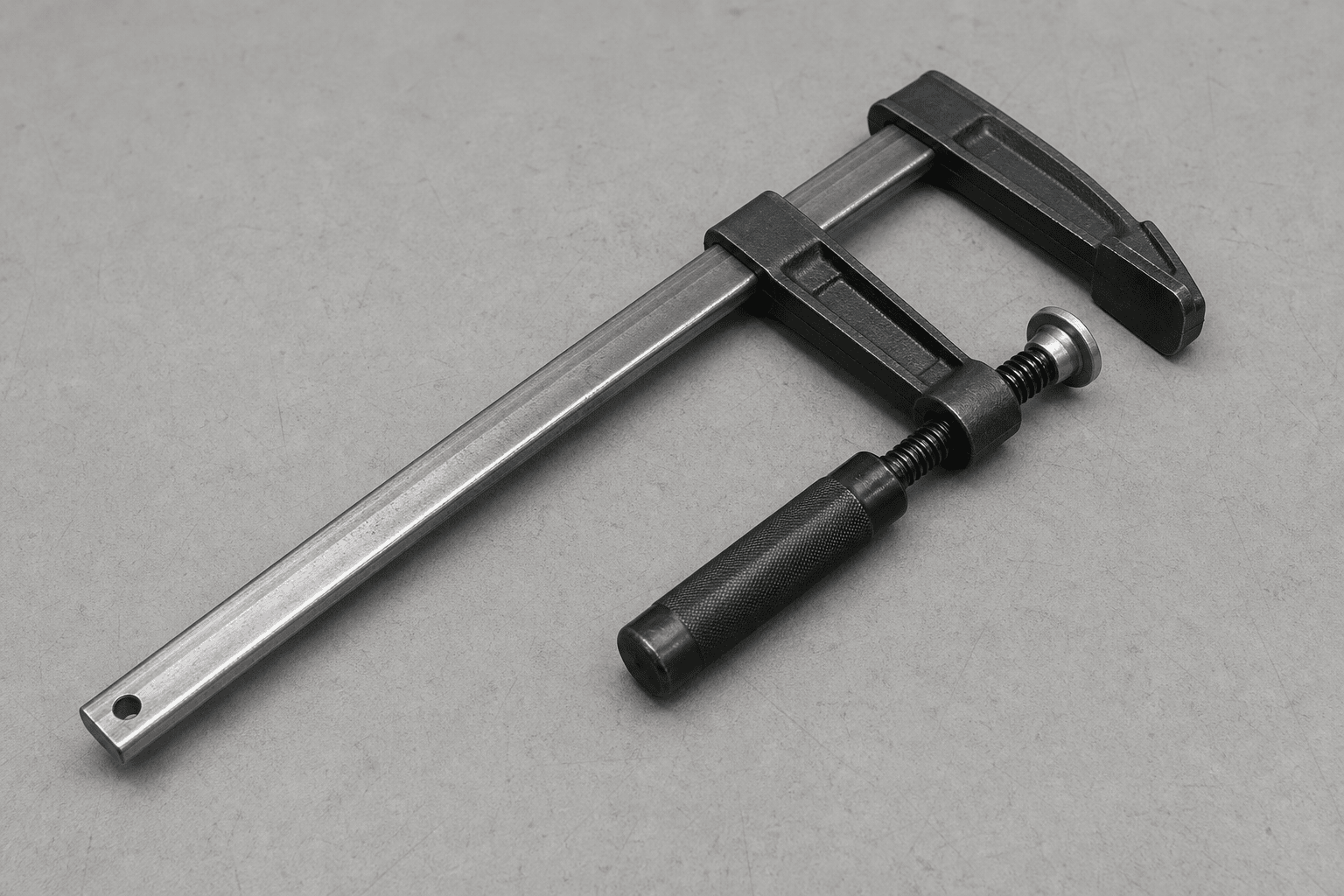 Source photo: metallic glare, thread shadows, and handle colors violate 37 CFR § 1.84 if filed directly.
Upload into Product Photo to Patent Line Art with component callouts:
A utility patent line drawing of an adjustable bar clamp shown in side elevation, with a fixed jaw, a sliding jaw, a threaded screw, and a handle, with reference numerals and leader lines on a white background.
Generated monochrome draft (10 credits):
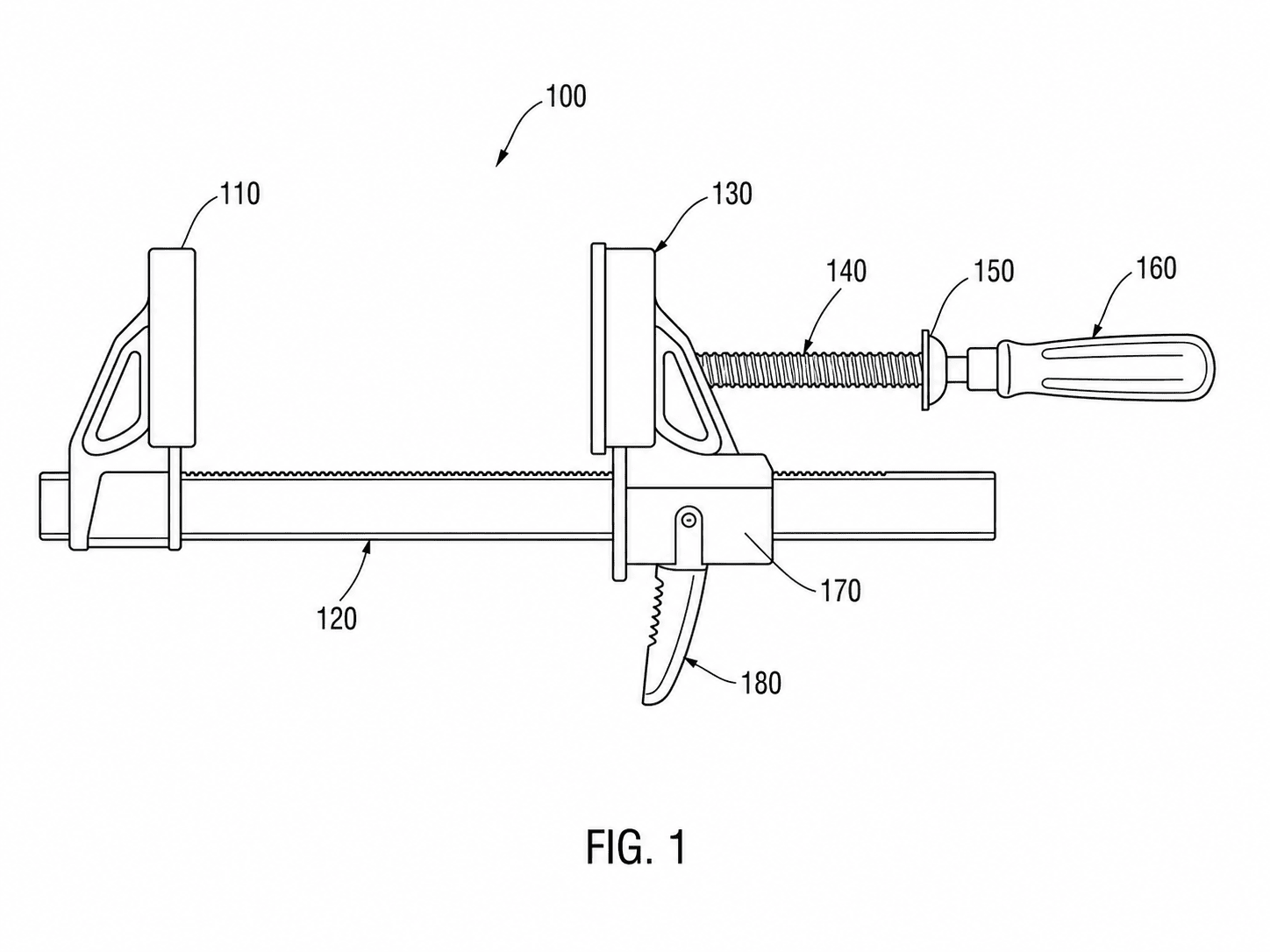 Converted draft: glare and color are stripped, threads become uniform strokes, and straight leader lines label four parts.
Example 2: Matte-Black Electronics Photo → Perspective Utility Line Art (Wireless Router)
Matte-black enclosures have low edge contrast—threshold filters collapse ports and LEDs into black blobs. Upload the router photo to Product Photo to Patent Line Art and enter:
A utility patent line drawing of a wireless router converted from a product photo into clean line art, in perspective with the antennas, ports, and indicator lights labeled by reference numerals.
Generated perspective draft:
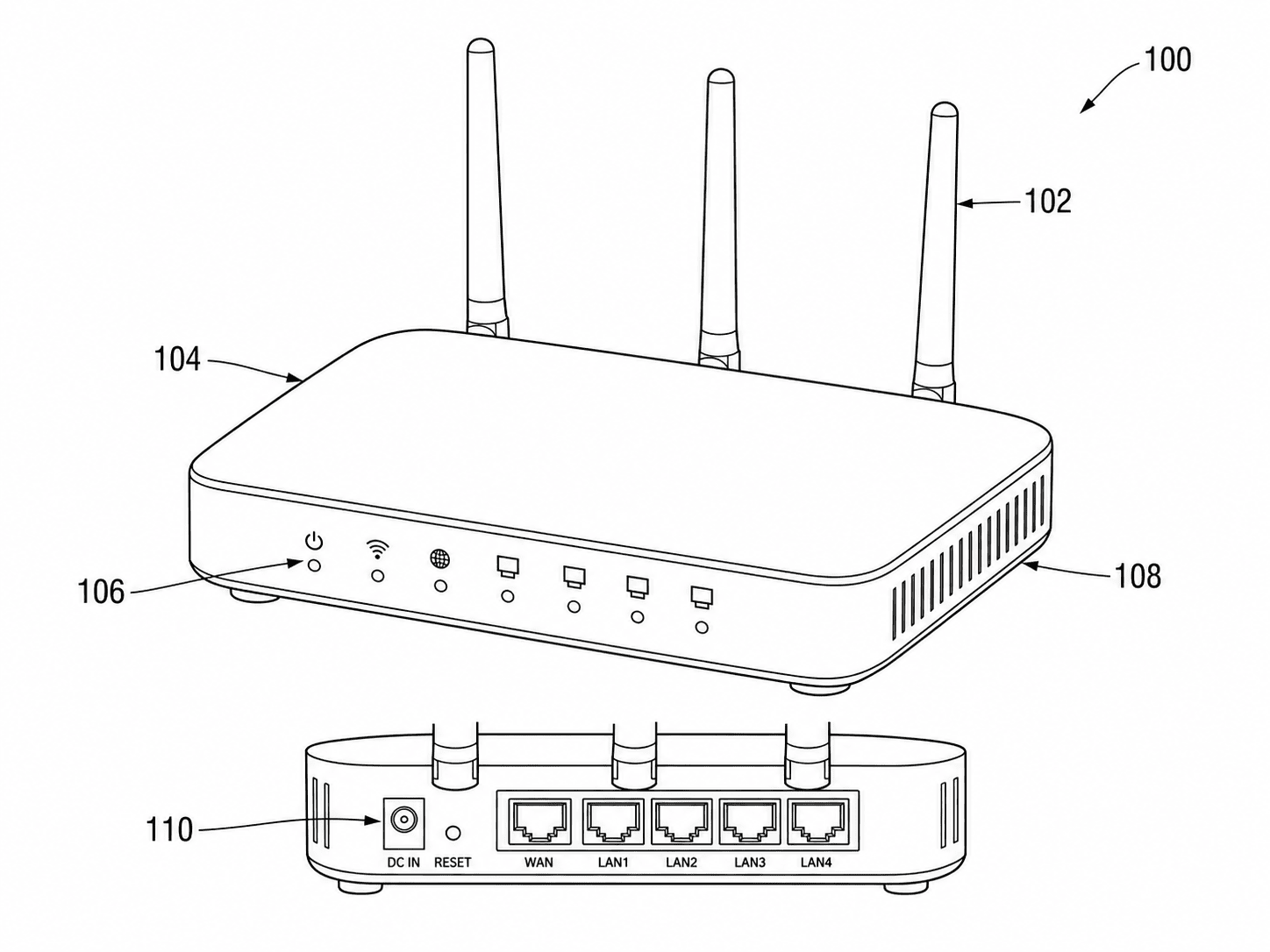 Perspective draft: the dark housing flattens into black outlines on white while preserving antennas, ports, LEDs, and numerals.
Step 3: Vectorize to SVG / DXF and Verify Seams, Views, and Numerals
Never file raw AI output uninspected:
- Convert via the figure menu or Vectorize tool (20 credits) into a centerline
.svg,.dxf, or vector.pdf. - Open in Inkscape, Illustrator, or AutoCAD to confirm glare was not drawn as extra seams or screws, verify proportions across views, and audit every reference numeral against your specification without duplicates or omissions.
- Run the Patent Figure Checker (20 credits) for contrast, margins, and 300+ DPI resolution, then export PDF or TIFF sheets for practitioner review.
5 Common Mistakes That Trigger USPTO Drawing Objections
- Filing Raw Photos, Grayscale Conversions, or Sketch Filters: Unpetitioned photos violate 37 CFR § 1.84(b), and gray filter washes force Replacement Sheets under 37 CFR § 1.121(d).
- Leaving Logos, Part Numbers, or Benchtop Clutter: Trademarks, QR codes, and cords violate 37 CFR § 1.84(p); peel labels before shooting or delete them in SVG.
- Wide-Angle Close-Ups—or Expecting One Photo to Show Unseen Views: Close smartphone shots distort proportions across views; hidden rear faces and internal gears require extra photos or section sketches.
- Shipping Uncleaned Auto-Trace Double Contours: Outline auto-tracers wrap each stroke in twin closed paths that plug up at two-thirds print reduction (37 CFR § 1.84(k)).
- Skipping Manual Specification-to-Numeral Audits: Highlights can look like split lines, and auto-placed numerals may omit a claimed element (
§ 1.84(p)(5)) or duplicate a number (§ 1.84(p)(4)).
Frequently Asked Questions (FAQ)
Can I file raw product photographs directly in a USPTO patent application?
Generally no. Under USPTO 37 CFR § 1.84(a)(1) and § 1.84(b) (plus CNIPA and PCT Rule 11), black-and-white line drawings are mandatory for utility and design filings. Photos are accepted only via petition in narrow cases—such as gels, tissue sections, or micrographs—where line art cannot depict the subject matter. Mechanical and electronic prototypes must be converted into black-and-white line art.
What is the best completely free software for turning a product photo into patent line art?
Inkscape is the top free, open-source option on Windows, macOS, and Linux: lock a perpendicular photo on a bottom layer at 30%–40% opacity, trace outer contours and seams with the Bezier Pen tool, add straight leader lines and numerals at least 3.2 mm (1/8 inch) tall, and export watermark-free SVG or vector PDF files. To preview an automated monochrome draft first, PatentFig AI provides 20 free sign-up credits (30 days) plus 10 non-cumulative daily credits (10 credits per figure).
Why do Photoshop edge filters and Illustrator Image Trace outputs get rejected?
Photos capture lighting gradients rather than clean boundaries. Photoshop Find Edges and Threshold stacks turn shadows into gray speckle and broken contours, while Illustrator Image Trace wraps dark areas into closed double-contour shapes of uneven width. Without manual redrawing, both fail rules requiring uniform black strokes on pure white that stay legible at two-thirds reduction.
What kind of product photo produces the cleanest patent line art, and what file limits apply?
Follow five rules: shoot one assembled product, use a plain white or light-gray matte backdrop, light evenly with diffused lamps, shoot perpendicular at a normal focal length, and mask or peel off brand logos. On PatentFig AI, reference images must be JPEG, PNG, or WebP up to 4 MB per image; hidden internal mechanisms require a disassembly photo or cross-sectional sketch.
Can AI-generated line art from a product photo be filed as-is, and is pre-filing data confidential?
Never file unverified AI output directly. AI cannot draw complex internal structures hidden inside an opaque shell, multi-view consistency must be verified manually, and reference numerals must be audited against your claims and specification. PatentFig AI is a drawing tool—not a law firm or patent agency—and gives no legal advice. Per its published policy, customer uploads and generated figures are not used to train AI models; review vendor terms against internal IP security rules before uploading sensitive prototypes.
Autor

Categorías
Más publicaciones
What Software Is Used for Patent Drawings? AutoCAD, SolidWorks, Visio, Inkscape & AI Tools Compared (2026)
Compare AutoCAD, SolidWorks, Microsoft Visio, draw.io, Inkscape, Adobe Illustrator, outsourced patent illustrators, and PatentFig AI across pricing models, export formats, USPTO 37 CFR 1.84 compliance, and honest trade-offs.
USPTO vs. CNIPA Patent Drawing Requirements: Side-by-Side Rules and the Right Tools for US–China Filings (2026)
How USPTO drawing rules (37 CFR § 1.84) differ from CNIPA on sheet size, margins, shading, reference numerals, figure labels, views, and file formats — plus an honest comparison of manual review, AutoCAD/Visio, SolidWorks, Illustrator, Inkscape, drafting services, firm templates, and PatentFig AI.
Herramientas de IA para redactar patentes en 2026: 10 herramientas con nombre, precios y el lugar de las figuras
Guía con nombres propios del panorama de IA para patentes en 2026 — Solve Intelligence, DeepIP, Patlytics, Rowan Patents, PatentPal, IPRally, PQAI y más — con precios publicados y una mirada honesta a cuáles producen realmente dibujos de patente.
Boletín informativo
Únete a la comunidad
Suscríbete a nuestro newsletter para recibir las últimas noticias y actualizaciones